
Scenes?

Users Who Are Viewing This Thread (Total: 0, Members: 0, Guests: 0)

ken.grimmett

New member
Joined
Apr 22, 2025
Messages
1
Reaction score
0
Location
Ohio
Hello,
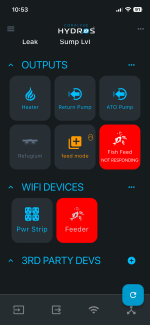
Hoping this question hasn’t been asked and I’m not finding it. I have the Auto Feeder, but I only use it when I go out of town for more than a day. When not in use I just unplug the feeder and turn off the outputs needed to actually schedule and feed. Is there a way to hide these or remove them from the screen then reload them again when I need to use the feeder? I know it’s not a big deal for them to be there it’s just personally I don’t like the red on the screen.

Thanks,
Ken…
 

Attachments

  • IMG_9891.png
    IMG_9891.png
    199.3 KB · Views: 1
Hello,
Hoping this question hasn’t been asked and I’m not finding it. I have the Auto Feeder, but I only use it when I go out of town for more than a day. When not in use I just unplug the feeder and turn off the outputs needed to actually schedule and feed. Is there a way to hide these or remove them from the screen then reload them again when I need to use the feeder? I know it’s not a big deal for them to be there it’s just personally I don’t like the red on the screen.

Thanks,
Ken…
Create a page for the feeder and then setup that page with the feeder output only as the only output. Since you will need a input also you can set it to what ever one you choose and the set the arrow to the left of the input heading so it points down instead of up to close that category. To select which tiles are shown press and hold one in the category that you want to do this with and release it. Then there should be a check box for each tile. If it is checked it will show on that page. If it is unchecked it will not show on that page. You can also move them around so you can change the order they are displayed. You can also create another output that is a constant output and use that output in the depends on of the feeder output and set the dependency mode to either off if on or off if off depending on whether the output is setup to be on or off when you want the feeder to run the schedule. That way you can leave it all setup and just turn that output on or off depending on the way you set it up when you want the feeder to run the schedule.
 
Last edited:
Back
Top