Sharing my DIY AWC Pumps

  • Thread starter Thread starter TanAsh
  • Start date Start date
  • Tagged users None

Users Who Are Viewing This Thread (Total: 0, Members: 0, Guests: 0)

TanAsh

Member
Joined
Nov 24, 2024
Messages
50
Reaction score
19
Location
Edmonton ab
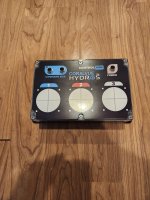
Many people private message me on Facebook asking about the parts I used to make my AWC pumps. Therefore, I will share them here on this forum.
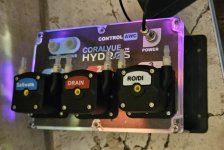
20250417_221056.jpg

Parts needed: 3 Kamoer KPHM 400 12V brushed motors Amazon.com
9.06" x 5.90" x 3.43" project box Amazon.com
CoralVue Hydros XD HYDROS Control XD (Controller Only)
One male and one female GX12 4-pin connector Amazon.com
Two male and two female GX12 6-pin connectors Amazon.com
8.5" x 11" printable vinyl sticker paper Amazon.com
Clear spray paint Amazon.com
4-wire conductor cable Amazon.com
6-wire conductor cable Amazon.com
2-wire conductor cable Amazon.com
Six wire crimp ends Amazon.com
Heat shrink tubing Amazon.com
..............................................................................................................................
Tools needed:
  • 2 3/16" hole saw
  • 1/2" drill bit
  • 1/8" drill bit
  • Drill or drill press
  • Soldering iron
  • Crimper
  • Color inkjet printer with ink (any brand and model)
  • scissors
  • ........................................................................................................................
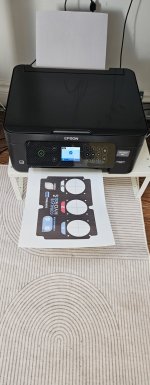
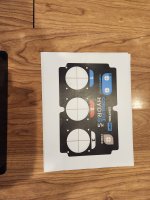
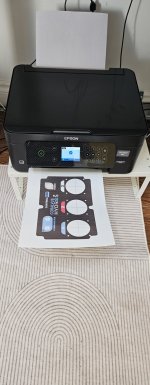
Print the PDF file below with your inkjet printer using vinyl sticker paper. (It's a good idea to test print the decal label with regular paper first before using the vinyl sticker paper, in case you need to adjust your printer settings).
20250417_112648.jpg

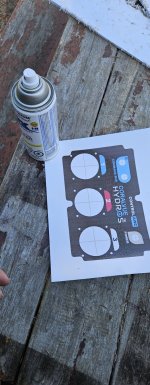
Once it's printed, spray it with clear paint (a couple of coats should suffice) to make it water-resistant, then let it dry completely).
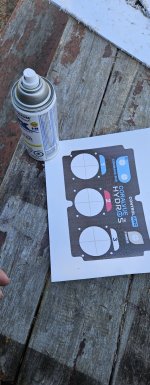
20250417_113543.jpg

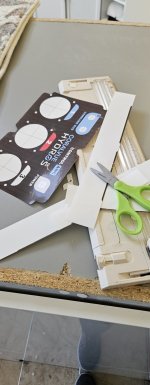
Use scissors to cut out the label (make sure not to cut the circles with the cross).
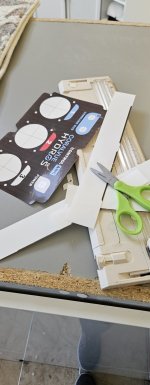
20250417_114237.jpg
 

Attachments

  • 20250417_221056.jpg
    20250417_221056.jpg
    957.5 KB · Views: 20
  • 20250417_124101.jpg
    20250417_124101.jpg
    250 KB · Views: 16
  • 20250417_121933.jpg
    20250417_121933.jpg
    174.1 KB · Views: 17
  • 20250417_114237.jpg
    20250417_114237.jpg
    168.4 KB · Views: 12
  • 20250417_113543.jpg
    20250417_113543.jpg
    296 KB · Views: 12
  • 20250417_112648.jpg
    20250417_112648.jpg
    248.2 KB · Views: 21
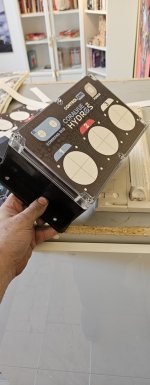
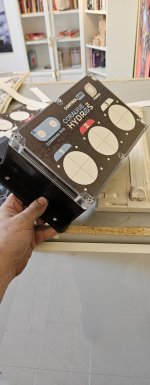
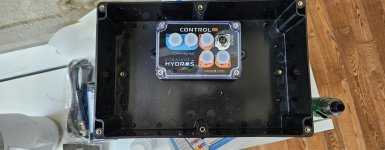
Stick the decal label onto the project box (make sure it fits perfectly before sticking it).20250417_121933.jpg

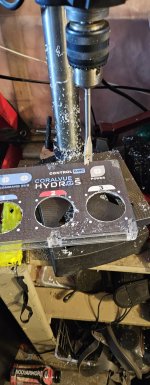
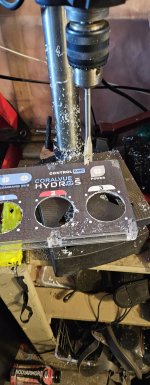
Drill the pump holes with the 2 3/16" hole saw, the GX12 connector holes with a 1/2" drill bit, and the pump mounting holes with a 1/8" drill bit.
20250417_124101.jpg

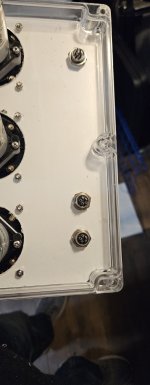
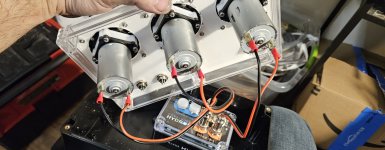
Bolt the pumps with the screws and nuts. Mount two GX12 6-pin male connectors into the command bus holes and the GX12 4-pin male connector into the power hole.
20250417_131822.jpg

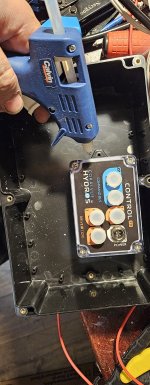
Use hot glue to mount the XD inside the project box, as shown in the pictures.
20250417_135624.jpg
20250417_131226.jpg

Now, you need to make your own cables using GX12 connectors, heat shrink, and solder. To connect the pumps to the XD drive port, you will need to solder a GX12 2-pin female connector to one end of the cable and crimp connectors onto the other end. The GX12 2-pin connector, pin one is negative, and pin two is positive. The pump motor has one pin with a red dot; this is the positive pin.
As for the GX12 6-pin command bus and GX12 4-pin power, wire them one-to-one.
20250417_143413.jpg

Once all is done, install the gasket included with the project box, then close and screw the project box shut.Hope this was helpful. Thanks for reading.
 
the STL for the pump labels (Saltwater,Drain,RO/DI) in the link bellow
 
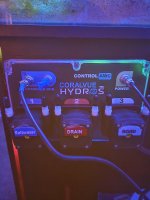
I would like to say a huge thank you for taking the time to openly share your idea, PDF file for the sticker paper print out and the files for the 3D printed pieces. It has taken me a few weeks to put this together. I just mounted it tonight and have added it to my collective. I still have to set up the AWC schedule, ATO top off & run the water lines but I am incredibly greatful of your generosity and cant thank you enough. It's been a fun project and cheaper than buying 3 Hydros Soles for these functions & can pass of for a Hydros product.
 

Attachments

  • 20250601_205114.jpg
    20250601_205114.jpg
    892.6 KB · Views: 22
  • 20250507_180446.jpg
    20250507_180446.jpg
    2.3 MB · Views: 19
  • 20250507_180430.jpg
    20250507_180430.jpg
    2.2 MB · Views: 22
I would like to say a huge thank you for taking the time to openly share your idea, PDF file for the sticker paper print out and the files for the 3D printed pieces. It has taken me a few weeks to put this together. I just mounted it tonight and have added it to my collective. I still have to set up the AWC schedule, ATO top off & run the water lines but I am incredibly greatful of your generosity and cant thank you enough. It's been a fun project and cheaper than buying 3 Hydros Soles for these functions & can pass of for a Hydros product.
You welcome,
 
Many people private message me on Facebook asking about the parts I used to make my AWC pumps. Therefore, I will share them here on this forum.
View attachment 5133

Parts needed: 3 Kamoer KPHM 400 12V brushed motors Amazon.com
9.06" x 5.90" x 3.43" project box Amazon.com
CoralVue Hydros XD HYDROS Control XD (Controller Only)
One male and one female GX12 4-pin connector Amazon.com
Two male and two female GX12 6-pin connectors Amazon.com
8.5" x 11" printable vinyl sticker paper Amazon.com
Clear spray paint Amazon.com
4-wire conductor cable Amazon.com
6-wire conductor cable Amazon.com
2-wire conductor cable Amazon.com
Six wire crimp ends Amazon.com
Heat shrink tubing Amazon.com
..............................................................................................................................
Tools needed:
  • 2 3/16" hole saw
  • 1/2" drill bit
  • 1/8" drill bit
  • Drill or drill press
  • Soldering iron
  • Crimper
  • Color inkjet printer with ink (any brand and model)
  • scissors
  • ........................................................................................................................
Print the PDF file below with your inkjet printer using vinyl sticker paper. (It's a good idea to test print the decal label with regular paper first before using the vinyl sticker paper, in case you need to adjust your printer settings).
View attachment 5134

Once it's printed, spray it with clear paint (a couple of coats should suffice) to make it water-resistant, then let it dry completely).
View attachment 5135

Use scissors to cut out the label (make sure not to cut the circles with the cross).
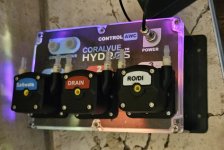
View attachment 5136
I have this down as one of the first projects I will do when I retire! Counting down!! Thanks for sharing.
 
Updated ** (Canadian link ) 🇨🇦🇨🇦🇨🇦

Parts needed: 3 Kamoer KPHM 400 12V brushed motors

9.06" x 5.90" x 3.43" project box

CoralVue Hydros XD HYDROS Control XD (Controller Only)

One male and one female GX12 4-pin connector

Two male and two female GX12 6-pin connectors

Two male GX12 2-pin connectors

8.5" x 11" printable vinyl sticker paper

Clear spray paint

4-wire conductor cable

6-wire conductor cable

2-wire conductor cable

Six wire crimp ends
 
Holy cow, nice you put it here.
I saw this somewhere else yesterday too..
 
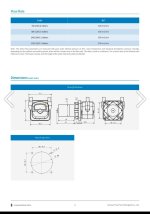
Updated on Kamoer pumps for higher-speed pumps.

Kamoer KPHM 600 pumps (600 ml/min) are available on Amazon.

Based on the Kamoer drawing, they should fit into my AWC pump enclosure without modifications. However, only the Kamoer KPHM 400 ml/min pump has been tested.

If you decide to try the 600 ml/min pump instead of the 400 ml/min pump, please let us know.

Amazon USA (600 ml/min pumps):

Amazon Canada (600 ml/min pumps):
 

Attachments

  • Screenshot_20250611_151607_Chrome.jpg
    Screenshot_20250611_151607_Chrome.jpg
    86.1 KB · Views: 12
Just ordered all the goodies I’ll need to build those with the 600 pumps. Super excited to give this a go. What size tubing do I need or can I use RO tubing? What about a short line with an RO quick connect added for easier maintenance? Also any chance the pump labels are available to print on the sticker paper or is it just the 3D print files that are available?
 
Just ordered all the goodies I’ll need to build those with the 600 pumps. Super excited to give this a go. What size tubing do I need or can I use RO tubing? What about a short line with an RO quick connect added for easier maintenance? Also any chance the pump labels are available to print on the sticker paper or is it just the 3D print files that are available?
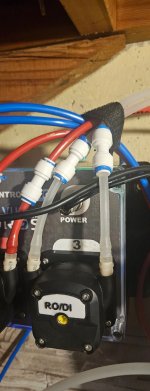
I used RODI tubing. I cut about 2" of the tubing, then I heated one end with a lighter to soften the tube. Then, I slid it on the pump barb. Finally, I used a RODI union to connect the line as shown in the picture.
As far as the pump label, it's 3D printed, but I can make it as a paper-printed sticker and share the PDF file later when I have a bit of free time.
 

Attachments

  • FB_IMG_1750706393906.jpg
    FB_IMG_1750706393906.jpg
    110.4 KB · Views: 20
If you're going to use the 600ml/h pumps, just keep in mind the pumps are a bit wider than the 400ml/h. As I never tested them, make sure to double-check the pump spacing.
First, only drill the pump number 2, then check the distance from the center of the first pump to the second, same as the 3rd pump to the second, to make sure it will fit.
If it's too close, space them a bit further by 1mm or so, just to be safe.
 
If you're going to use the 600ml/h pumps, just keep in mind the pumps are a bit wider than the 400ml/h. As I never tested them, make sure to double-check the pump spacing.
First, only drill the pump number 2, then check the distance from the center of the first pump to the second, same as the 3rd pump to the second, to make sure it will fit.
If it's too close, space them a bit further by 1mm or so, just to be safe.
Thanks for the heads up
 
I used RODI tubing. I cut about 2" of the tubing, then I heated one end with a lighter to soften the tube. Then, I slid it on the pump barb. Finally, I used a RODI union to connect the line as shown in the picture.
As far as the pump label, it's 3D printed, but I can make it as a paper-printed sticker and share the PDF file later when I have a bit of free time.
I think that’s the route I’ll go. Don’t sweat the labels. I think I’m just going to relabel tha main sticker to have those labels instead of the numbers
 
Back
Top