Skimmer Pause Certain amount of time a day

  • Thread starter Thread starter Jakal
  • Start date Start date
  • Tagged users None

Users Who Are Viewing This Thread (Total: 0, Members: 0, Guests: 0)

Jakal

New member
Joined
Sep 9, 2021
Messages
7
Reaction score
1
Location
home
Hi Everyone,

I am not sure if this has been answered before, but I would like to pause my skimmer 15 minutes twice a day(if not possible, once a day), every day.
Is this possible to do while keeping its current skimmer configuration features which are working well such as off when main pump is off, and 5 minute start delay.

Thanks!
 
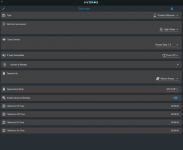
Yes, it can be done with a little modification to the setup of the skimmer. Can you post screenshots of how you have it set right now? Also what times are you wanting it to stop?
 
I would like to pause it for 10 minutes at 9:00AM and 6:00PM every day.

SkimmerSetup.PNG
 
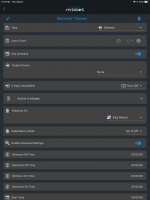
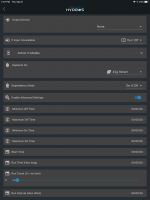
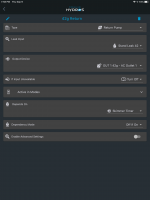
Ok create an output using the generic type with inputs set to 0. The first two screenshots below are the output I created. Set has schedule to on and enable advanced setting to on. Set the depends on to your return pump since we need to change the depends on on the skimmer to this output but with a change. Also set it to on am and run for 5 minutes. This is because you have a 5 minute delay set on the skimmer. That delay does not start till the depends on clears which is controlled by this output. Run count is set for 2 since we want it to run twice. The run interval is set for 9 hours since the second run is 9 hours from the first run. That is it for this output. Now to the skimmer output. Set the skimmer depends on to the name of the output created below. The third screenshot is my skimmer output with the depends on changed to the output created below. Not set it for off if on. This is because we want the skimmer to be off if the skimmer timer output is on. This should work but please test it to make sure since I did not have a chance to test it.

0AADEE4C-4DB8-4213-9C4A-3CFE0C25D012.png

42549519-5969-426A-AA69-A8F2C3F90DF3.png

4460CB98-8672-4FD9-BCDE-1D9E4CF1B0BB.png
 
Thank you!, I will take a look and try to see how it would work, but I think that makes sense.
 
Unfortunately After creating this timer, Upload fails every time. I will try to create it again.
Correction: It fails but it actually uploaded, when I went back into outputs it was saved.
 
If you don't get it to load you may have to reboot the controller if it is the issue. It could also be it was not updating to the cloud.
 
Thank you, it looked like it uploaded to cloud fine, but failed during uploading to the local device. So even though it looked like it was properly set up it never worked. I had to reboot the controller, and then re-upload it, and after that it started working.

Thank You!
 
If the upload fails I will usually retry a couple of times and if that doesn't work I will reboot the offending controller and retry. It will let you retry if you wait a minute or two. I have 8 controllers in a collective so this is not too unusual. Most of the time it will go through if I retry it a few times and I don't have to reboot the controller that fails.
 
Back
Top