
I recently switched from another doser to the Sole for my kalk reactor. It would be much easier for me to enter a daily dosing volume instead of having to specify mL/min. I also used to be able to specify different dosing amounts for parts of the day. For example if I wanted to keep my pH up at night I could set my doser to dose 2 liters between 8pm - 8am and then 1 liter from 8am - 8pm. I couldn’t find a way to do this but a lot more control would be helpful.
Navigation
Install the app
How to install the app on iOS
Follow along with the video below to see how to install our site as a web app on your home screen.
Note: This feature may not be available in some browsers.
More options
You are using an out of date browser. It may not display this or other websites correctly.
You should upgrade or use an alternative browser.
You should upgrade or use an alternative browser.
Smart doser options
- Thread starter Karsa
- Start date
- Tagged users None
Users Who Are Viewing This Thread (Total: 0, Members: 0, Guests: 0)

Danny
HYDROS Expert
You can setup the output as a doser and use a dosing schedule or schedules if you want to do that.I recently switched from another doser to the Sole for my kalk reactor. It would be much easier for me to enter a daily dosing volume instead of having to specify mL/min. I also used to be able to specify different dosing amounts for parts of the day. For example if I wanted to keep my pH up at night I could set my doser to dose 2 liters between 8pm - 8am and then 1 liter from 8am - 8pm. I couldn’t find a way to do this but a lot more control would be helpful.
Danny
HYDROS Expert
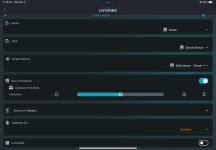
You have runs constantly turned on. Doing that the only control you would have is with the depends on settings. If you want to use it in a schedule the turn that setting off.
Danny
HYDROS Expert
You can probably do what you want but it would require moving the stirrer out of the Kalk reactor output type so you can use it as the depends on on the doser. With the stirrer in the output too the doser would come on if either the pump or stirrer output is on since there is only one depends on per output.

thom_smith
HYDROS Expert
Agree with @Danny. Toggle Runs Constantly off and then use left dropdown SCHEDULES to associate with external schedule(s). Gives you more flexibility to break up dosing however you want. i.e. Higher dosage durimg the day. Lower dosage at night. The schedule will do the math and figure out how long the pump needs to run and when after you put in Start Time, End Time and Dose Count. For clarity, individual doses are Total Dose / Dose Count. With Minnow, Sole and X10 Smart Dosers you can even change Speed in the schedule to deliver dose over a longer or shorter individual dose duration. Personally recommend staying close to the rate you calibrated at but it can be done.
thom_smith
HYDROS Expert
Agree with @Danny. Toggle Runs Constantly off and then use left dropdown SCHEDULES to associate with external schedule(s). Gives you more flexibility to break up dosing however you want. i.e. Higher dosage durimg the day. Lower dosage at night. The schedule will do the math and figure out how long the pump needs to run and when after you put in Start Time, End Time and Dose Count. For clarity, individual doses are Total Dose / Dose Count. With Minnow, Sole and X10 Smart Dosers you can even change Speed in the schedule to deliver dose over a longer or shorter individual dose duration. Personally recommend staying close to the rate you calibrated at but it can be done.
For individual schedules consider making your Dose Count 1, do a little bit of math and set the Speed below the schedule so that it runs the whole or close to whole Start Time to End Time duration.