Sync configuration between apps

Users Who Are Viewing This Thread (Total: 0, Members: 0, Guests: 0)

jtichenor

Member
Joined
Oct 6, 2021
Messages
32
Reaction score
6
Location
Portland, OR
I have a dedicated iPad for the Hydros and other aquarium related apps and devices.
I also use my Android phone to access the same apps.

I have run into a condition multiple times since setting up the Hydros where I make a change to the Hydros configuration on one device [iPad] and then make another configuration change on another device [Android phone]. Because the phone app is not in sync with the updated configuration I made on the iPad it will overwrite the Hydros with phone configuration and will lose the modifications I made on the iPad.

This also applies to PH calibration data.

I can work around this by signing-out and back in to my Hydros apps after making a configuration change to download the latest Control configuration.

Please create a mechanism to keep the configuration data in sync between multiple signed-in Hydros apps.
 
I have not had this issue, but I always close the app after I use it. Most of the time I access from my iPad. I usually never log out of the app though. I also have an android phone but rarely change anything with the phone. I will have to try it.
 
Ok, I changed something on my iPad then opened the app on my phone and the change was there on the phone. I assume it does a sync when opening the app.
 
Ok, I changed something on my iPad then opened the app on my phone and the change was there on the phone. I assume it does a sync when opening the app.
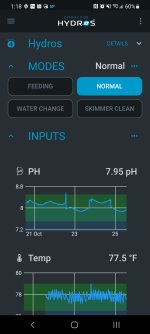
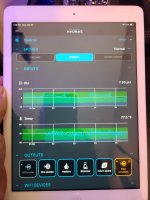
I created a new mode on my phone and opened the iPad, refreshed the app, and the new mode is not there. See screenshots:

Skimmer mode just added:
Screenshot_20211025-131858.jpg

Skimmer mode missing from ipad:20211025_131850.jpg

I also reopened the iPad an hr later and refreshed. Skimmer mode still not there. This is consistent with what have been experiencing.
If I kill the iPad app and reopen it the new mode is present.
 
Yes, I always close my apps when I am done using them On the phone or iPad. I do think it syncs when the app opens.
 
Correct - they do sync if the app was closed. I've tested and can confirm this works.
So my enhancement request is to sync the configuration without having to close and reopen the app. I (and I'm sure most other users) do not close apps on our mobile devices regularly.
At a minimum, give us a banner or alert in an app that it is out of sync with the controller along with advise to restart the app.
 
This is something we are currently working on to make it better. So, therefore, I cannot offer you an ETA, but it is something we are working on.
 
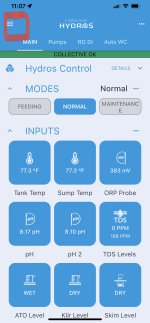
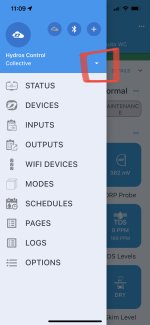
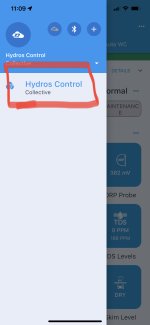
The other option to “sync with current version” is to re-select the control unit or collective from the top left menu. First select menu which will show the choices Status, devices, input, outputs,etc. Now click the down arrow beside the name of your device or collective This will show list of your control unit/s or collective. Click on the unit or collective name and it will force a reload to update from the cloud server any changes you made.

This method, or as you discovered, killing the app will keep you synced as you go from device to device after making changes.

FB737693-BD45-4EDB-AC76-5BE04C7AA160.jpeg617F05AC-394F-428A-BF40-0B76C249F598.jpegF5FB3192-DBF7-4C90-8FD2-9DECF460CC7C.jpeg
 
Back
Top