Temperature Chart Display Issue

Users Who Are Viewing This Thread (Total: 0, Members: 0, Guests: 0)

ilovehotsauce

New member
Joined
Jan 28, 2021
Messages
23
Reaction score
6
Location
Austin, TX
Hi there-

Just now getting my new hydros devices setup. I'm pretty excited to get things going!

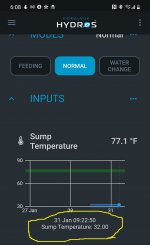
I'm noticing two issues with the temperature chart that I'm hoping can be resolved. Please see the screenshot below.
  1. When viewing the temp in text or tile the correct temp is shown, however the graph is plotting a straight value of 32. It hasn't changed, despite the temperature of the water climbing over the last 30 minutes.
  2. The timezone displayed in the graph does not match the local time.
Troubleshooting: I've toggled the temperature units in the app, and also closed and restarted the app/phone but no change.

Any ideas? Thanks in advance!

Screenshot_20210131-180812.jpg
 
I think I can answer issue #2. See the blue dot at the end of the blue line? That is a moment in time. If you touch/click along the blue line you will see the time change. Now try clicking on the blue line as far to the right as possible. You should see a more up to date timestamp.
Edit: my bad.... that’s not it.
 
Also make sure you are running the latest firmware version, Click the 3 dots at the upper right of the app screen. The latest version is 165. It addresses some graphing issues.
 
Thanks for considering my issues and providing thoughtful replies!

I have set the timezone, and it looks like it looks like I'm already on 165. I don't recall seeing it update, so I assume it shipped with this firmware.
 
You’re welcome. I’m sure you’ve already tried restarting the controller. Not sure what else to suggest other than maybe deleting the temp input, clear cache in the upper right menu, restarting the controller and then re-adding the sensor?
 
Deleting the input and creating a new one (I did use a distinct name) resolved both issues! Thanks again for taking the time and providing your suggestions.
 
I’m also having a problem with graphing on my ORP, TEMP,PH was told it was a bug that was trying to be Resolved does anyone have an idea when the bug will be taking care of?
 
Hey Moparguy -

In my case I created the inputs before adjusting the units (C/F) and timezone in the settings, and I believe that the inputs continued to reference these initial settings. Deleting and re-adding corrected my issues.

Have you tried re-adding the inputs?
 
I’m also having a problem with graphing on my ORP, TEMP,PH was told it was a bug that was trying to be Resolved does anyone have an idea when the bug will be taking care of?
Yes, we are near the end of our testing phase of the new firmware. Once we have it, we will release the updated firmware and app and take care of your problem. We are very sorry for the inconvenience.
 
Back
Top