JeffB418
HYDROS Expert
Ever wanted to have alarms for the following sorts of things:
- If a pump output has been off too long?
- If a sensor has gotten WET (extra optical sensor in overflow or filter sock chamber)?
You can use generic/combiner outputs as alarms in this case. If a standard output or input profile doesn't have the type of alert you want or need already built into it, you can make it yourself. Here are two examples:
- First example, make an alarm for you display pump if it has been off over 30 mins but ignore this during feed modes or water change modes:
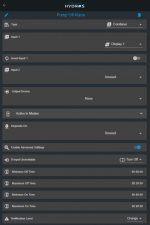
Here you just use a combiner output for this. Create a new combiner output for the OFF or ON alarm you want to create. Select the output you'd like to monitor, for this example I selected my display pump "DISPLAY 1". Leave the second input unused. Then under Active in Modes, select the modes you'd like this alarm to be active. In my case I only selected normal, since I may turn off my display pump in a feed or water change mode. Finally enable advanced settings. Here you will either select Max OFF Time of Max ON Time based on the alarm you are generating. If its something that's normally ON (like a skimmer, pump, etc) you will want to use the Max OFF Time to set the alarm, in the example above I used 30 minutes. So after 30 minutes I will get an alert if my pump is OFF for 30 mins. If you want to know if your heater is running too long, you can use the Max On Time function instead and chose your heater output for the combiner input.
This time of alarm is handy for display pumps, skimmers, or other devices that you might MANUALLY force to OFF so that you can clean them, but might forget to set them back to AUTO after completing your maintenance.
- Second example is using a Hydros optical sensor for other locations such as in an overflow area or filter sock area. You can use a sensor in your overflow to alert you something might have clogged or a snail made its way into your overflow tube (its happened to me!). Also you could use an optical sensor in your filter sock area of your sump to alert you when it might be time to change your socks. This is how you would use a generic input to do that:
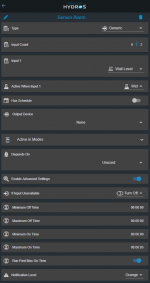
First setup your input as a standard water level sensor. When you do that, you will notice you can't set alarms for that input from that menu (currently). Next make a generic output for your alarm. You can combine multiple sensors into 1 alarm if you'd like but this example I only use 1. For this example I have an input called "Wall Level", lets assume this sensor is placed in my display overflow. Then you want the alarm output to trigger when WET, so set that for Active When Input 1. For this I leave the alarm active in ALL modes, unlike above, just because this alarm could happen in all states.... but that might change based on your setup. Finally you need to set a time for Max On Time to enable the Notification field. For this example I put 5 seconds since I want a quick alert to an issue but that's enough time to discount quick splashes on the sensor. Finally set your notification level.
Another example for the above case also is if you wanted to know when your ATO reservoir is running low. You'd put an optical sensor near the bottom of your ATO tank and do the same as above but instead select the Active When Input 1 to DRY, meaning alert you when the water has gotten below the sensor.
Finally you can use the above alerts to even control other functions. For the last example with the ATO sensor, you can use it to disable your ATO function/pump so that it won't burn out. Make sure Run Past Max On Time is enabled so that the alarm output doesn't clear when finally triggered. Then use the Depends On function under your ATO pump to turn "Off when ON", meaning your ATO pump will not run if your ATO sensor has gone dry. This example can be applied to many other examples as well.
This trick allows you to add many more alerts and alarms to your already powerful Hydros Controller.
- If a pump output has been off too long?
- If a sensor has gotten WET (extra optical sensor in overflow or filter sock chamber)?
You can use generic/combiner outputs as alarms in this case. If a standard output or input profile doesn't have the type of alert you want or need already built into it, you can make it yourself. Here are two examples:
- First example, make an alarm for you display pump if it has been off over 30 mins but ignore this during feed modes or water change modes:
Here you just use a combiner output for this. Create a new combiner output for the OFF or ON alarm you want to create. Select the output you'd like to monitor, for this example I selected my display pump "DISPLAY 1". Leave the second input unused. Then under Active in Modes, select the modes you'd like this alarm to be active. In my case I only selected normal, since I may turn off my display pump in a feed or water change mode. Finally enable advanced settings. Here you will either select Max OFF Time of Max ON Time based on the alarm you are generating. If its something that's normally ON (like a skimmer, pump, etc) you will want to use the Max OFF Time to set the alarm, in the example above I used 30 minutes. So after 30 minutes I will get an alert if my pump is OFF for 30 mins. If you want to know if your heater is running too long, you can use the Max On Time function instead and chose your heater output for the combiner input.
This time of alarm is handy for display pumps, skimmers, or other devices that you might MANUALLY force to OFF so that you can clean them, but might forget to set them back to AUTO after completing your maintenance.
- Second example is using a Hydros optical sensor for other locations such as in an overflow area or filter sock area. You can use a sensor in your overflow to alert you something might have clogged or a snail made its way into your overflow tube (its happened to me!). Also you could use an optical sensor in your filter sock area of your sump to alert you when it might be time to change your socks. This is how you would use a generic input to do that:
First setup your input as a standard water level sensor. When you do that, you will notice you can't set alarms for that input from that menu (currently). Next make a generic output for your alarm. You can combine multiple sensors into 1 alarm if you'd like but this example I only use 1. For this example I have an input called "Wall Level", lets assume this sensor is placed in my display overflow. Then you want the alarm output to trigger when WET, so set that for Active When Input 1. For this I leave the alarm active in ALL modes, unlike above, just because this alarm could happen in all states.... but that might change based on your setup. Finally you need to set a time for Max On Time to enable the Notification field. For this example I put 5 seconds since I want a quick alert to an issue but that's enough time to discount quick splashes on the sensor. Finally set your notification level.
Another example for the above case also is if you wanted to know when your ATO reservoir is running low. You'd put an optical sensor near the bottom of your ATO tank and do the same as above but instead select the Active When Input 1 to DRY, meaning alert you when the water has gotten below the sensor.
Finally you can use the above alerts to even control other functions. For the last example with the ATO sensor, you can use it to disable your ATO function/pump so that it won't burn out. Make sure Run Past Max On Time is enabled so that the alarm output doesn't clear when finally triggered. Then use the Depends On function under your ATO pump to turn "Off when ON", meaning your ATO pump will not run if your ATO sensor has gone dry. This example can be applied to many other examples as well.
This trick allows you to add many more alerts and alarms to your already powerful Hydros Controller.
Attachments
Last edited: