Warn when setting up an ATO without a high-water sensor defined

  • Thread starter Thread starter paticus
  • Start date Start date
  • Tagged users None

Users Who Are Viewing This Thread (Total: 0, Members: 0, Guests: 0)

paticus

New member
Joined
Nov 26, 2022
Messages
24
Reaction score
0
Location
California
I setup my ATO without a high water sensor definition on accident. I feel like an ATO without a sensor is uncommon and a potentially damaging mistake. I would consider inserting a warning before confirming that routine without a sensor or something that would stop it.

I was fortunately watching the ATO and caught it when it was running an extended time period.
 
It will not work without the full sensor. I guess the name High Water may be misleading. Was that on the ATO only output type or the AWC output type?
 
I just checked it is only labeled as High Level Input on the AWC output but that is what turns off both the ATO and fill pump so that may be the reason for the label. The only one that shows as optional is the Low Level Input.
 
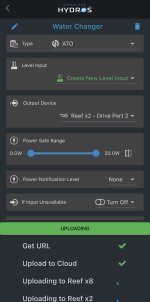
ATO. You are correct it's not labeled "High Water Sensor" it's just called "Level Input". I am able to leave it undefined which just turns on the ATO immediately and it doesn't stop. Check out the screenshot showing me uploading an ATO output without the level sensor defined.

IMG_1537.jpg
 
It does not say it is optional. I will let them know it allowed you to set it up without it selected.
 
Same with "Output Device". Not sure if that is intentional to setup without something selected.
 
ATO only for this entire thread, I can test the AWC side of things in a bit though.
 
Of coarse if you leave the output blank it will not turn anything on and some use outputs without a actual output assigned to it to use as an input to another output. We call them virtual outputs in the group. If you force the output assignment then that would take away that very useful tool. Also you can use generic output type to set up an ATO and that definitely will not stop you from setting it up with a water level input. When setting up things for the first time Alway be where you can see there is no unintended things that happen. This will go for any of the controllers that are around.
 
Thanks @Danny, the Virtual Outputs make sense.

To summarize though, I still think Hydros should consider a warning when setting up an ATO without an end condition or level sensor.

To reproduce:
XP8 (v263) and X2 (v266) in a Collective (not sure if this is device / version specific).
  1. Create new output
  2. Type: ATO
  3. Do not add anything to the "Level Input" Field
  4. Add an output device (such as a pump or doser)
  5. Upload Changes
Result: The ATO will start running immediately with no end condition.
 
I have reported this to them so they will check into what they can do, but they do not want to do something that will keep someone from using it in another way. Another thing on the ATO you need to set a maximum on time in the advanced settings. If you are using the Hydros ATO pump this will probably be seconds. Probably around 5-10 seconds but it is dependant on the size of you tank. Also turn off run past max on time. That will stop the pump f it runs the max on time setup and if you set an alert it will send an alert. I would also set a minimum off time also. Try 15 minutes to start. That will limit it to dispensing less what it can dispense in the maximum on time every 15 minutes. I would also try a minimum on time of 1 second. So once it is triggered on it will at least run that long. I set the maximum off time on mine for 6 hours. If it goes that long without topping off something is wrong. This will not turn on the ATO but will send an alert only. Hope this helps. None of this will help if you override the output to on though since the controller has no control of the output till you set it back to auto.
 
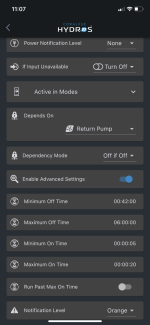
so can you confirm my understanding of my ato settings.

Min off time - 42min gets triggered 2 ways - 1) by return pump off 2) typical ato operation. Is this also why I see the ato pump output in “off waiting” status - its in the 42 minute forced off window.

Max off time - 6hr is a notification only trigger, this won’t turn on the pump.

Min and max on time - ato pump runs for at least 5sec and no longer than 20sec

0F1F446F-58BE-4427-A9B8-CBEFC6324824.png
 
Yes, it will show on the tile if it is waiting due to minimum off time not met but water level sensor is dry. It will also show if it is still running because of minimum on time when the sensor shows wet.

Maximum off time will only send an alert. It will not turn on the output. This is to alert you that it went the time set without doing a top off and needs to be checked. If this happens it is usually because the water level increased for some reason such as skimmer quit working or return pump flow is low or non existant.

You have it set to run at least 5 seconds but no more than 20 seconds. If you are using a higher flow pump make sure that will not overfill you sump if it runs that long. These settings are to prevent an overfill is something were to cause an error in the water level reading.
 
Last edited:
Back
Top