Water Change Mode

  • Thread starter Thread starter kl3377
  • Start date Start date
  • Tagged users None

Users Who Are Viewing This Thread (Total: 0, Members: 0, Guests: 0)

kl3377

Member
Joined
Dec 31, 2020
Messages
31
Reaction score
6
Location
New Hampshire
I want to set up water change mode so that the Temp Sensor and the Water Level Sensor for my ATO do not alert when I chose this mode. I can't seem to figure out where I can have these sensors "turn off" when I run this mode. Thanks
 
Did my first water change yesterday after setting up the controller and ran into the exact same thing. This would be a great feature to add.
 
I want to set up water change mode so that the Temp Sensor and the Water Level Sensor for my ATO do not alert when I chose this mode. I can't seem to figure out where I can have these sensors "turn off" when I run this mode. Thanks

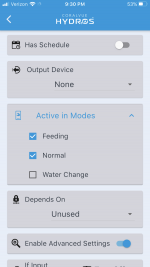
If you already have a Mode setup for Water Change (like Normal or Feed Modes under the Modes Menu), you can use the Active In Modes drop down menu under your ATO output to select which modes your ATO is linked to. Just uncheck the box for your new Water Change mode. This will make you ATO inactive during a water change mode, thus you shouldnt get an alarm.

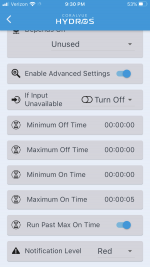
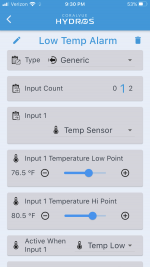
As for temperature, the easiest fix would to place your temp probe where it wouldn't get dry and read outside normal operating ranges. If that's not an option, you can get a little more creative and use secondary outputs for temp alarms instead of using the built in alarm on the temp probe. This is alittle more advanced but will give you the flexibility you want for now. You first disable the alarm in the probe itself then make 2 new Generic Outputs, one for a High Temp Alarm and one for Low Temp Alarm. Select your temp probe as the input, then for the High Temp Alarm set the limit using the slide bars and select Active When Input Hi. For the Low Temp Alarm set this to Active when Low. Then enable advanced options and set Maximum On Time to something like 5 seconds. This will then enable the Notification level for this alarm. So basically if temp goes above or below your selected range for 5 seconds, you will get an alarm from one of these 2 new outputs. Then under "Active In Modes" de-select your water change mode. This will disable your temp alarm if you are running a water change.

@Carlos, would it be possible to add "Active in modes" selection to sensors and probes notifications to disable their alerts during modes like water change?
 
If I set up one generic output, say for low, and use the temp probe as input (turn off in water change mode) would it override the low temp alert for the temp probe that I have set up for my two heater outputs?
 
If I set up one generic output, say for low, and use the temp probe as input (turn off in water change mode) would it override the low temp alert for the temp probe that I have set up for my two heater outputs?
No. They are separate alarms. You could just set the level for the temp probe really low to something that would never trigger it and then make the generic low alarm like you said. Just test all conditions that you make to double check your logic.
 
So I lowered my Temp Sensor to 70.5, fairly certain my temp did not drop below this when I did my water change. Below is a pic of the settings for the Generic Output. Does this look correct? I did shut off the Run Past Max On Time
 

Attachments

  • IMG_4844.PNG
    IMG_4844.PNG
    168.7 KB · Views: 15
  • IMG_4845.PNG
    IMG_4845.PNG
    151.9 KB · Views: 11
  • IMG_4846.PNG
    IMG_4846.PNG
    186.1 KB · Views: 13
So I lowered my Temp Sensor to 70.5, fairly certain my temp did not drop below this when I did my water change. Below is a pic of the settings for the Generic Output. Does this look correct? I did shut off the Run Past Max On Time
I believe you are good. Try it and pull the sensor out of the water and see if it alerts or put it in a glass of colder water. Best way to know if things work is to verify them. I always do. Gives you good piece of mind.
 
Tested and all seemed to work. I will just have to move my ATO Sensor before I start a water change to prevent that alarm from triggering.
 
Tested and all seemed to work. I will just have to move my ATO Sensor before I start a water change to prevent that alarm from triggering.
i'm still new at this, I have a whole 2 days of experience! but if you were to de-select water change on your ATO pump output, wouldn't that prevent the alarm from sounding during your water change since it is tied into your water level sensor? or you can just create another generic output for the water level sensor to get around the water change?
 
I believe that would prevent the pump from turning on but the Level Sensor would still alarm. Someone else may be better than me to answer tho
 
Back
Top