Water change schedule not running

Users Who Are Viewing This Thread (Total: 0, Members: 0, Guests: 0)

Travisr100

Member
Joined
Nov 9, 2025
Messages
32
Reaction score
1
Location
Houston
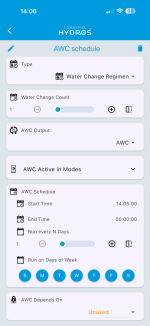
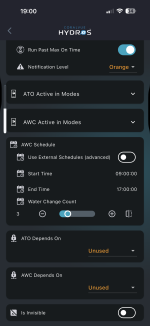
I am new to Hydros and I’m sure that I’m doing something wrong. I’ve set up an automatic water change output. I then went in and scheduled it. However, it doesn’t run on the schedule I set. Do I have the schedule configured incorrectly?

IMG_9181.pngIMG_9180.png
 
I beleive I figured out the problem. I set a regular schedule and the AWC output has its own built in schedule.
 
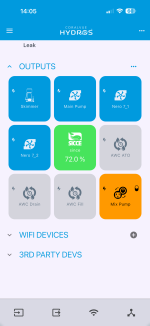
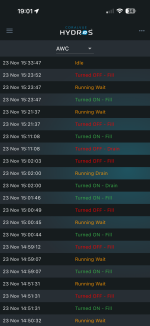
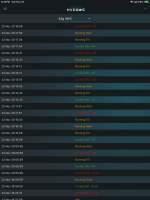
And this is odd to me as well. Don’t understand what “running wait” means. After scheduling it once and getting it to run I couldn’t get it to run on a schedule again until first turning one of the AWC outputs (don’t remember if it was drain or fill) on manually then switching back to auto.

IMG_9192.png
 
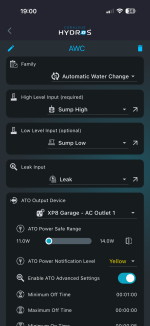
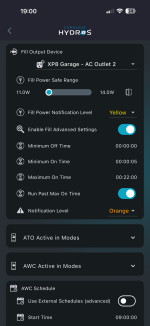
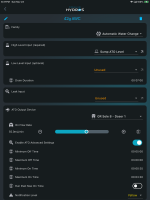
Ok on the output settings I don't see the part below for yours, I also noticed that you don not have use external schedule turned on so it will not run that external schedule unless that setting is turned on. If it is turned on it will not run the schedule you have setup in the output. So you will need to choose one. The high level input is the sensor for the ATO and also stops the fill pump. The low level input is an optional low level sensor if used it will drain until that sensor shows dry. Otherwise you use the drain duration setting and with that it will run for the duration and then turn off the drain. You also have it set to do 3 water changes in these settings. Not sure if that is what you want. The running wait is just tat the AWC is still active and has not finished yet. For a period of time after the fill pump first turns off if the high level sensor goes dry it will use the fill pump to top off instead of the ATO. Mine has the running wait statements also. I will post it as a second screenshot.

IMG_4274.png


IMG_4273.png
 
I posted these screenshots after I figured out that the AWC output has its own schedule built in and after I set it up to run the 3 water changes starting at 9:00 AM. Prior to this I did have an external schedule created and did not have the schedule within the ATO output setup, that's why it wasn't running. I figured that part out. Once I figured out the AWC had its own schedule I switched to that and would set that schedule to run a few minutes from the time I was sitting there. The first time I did so it ran with no problem. I then tried to schedule it a a minute or two in the future and it wouldn't run.

That's when I noticed the "running wait" in the log. You said "For a period of time after the fill pump first turns off if the high level sensor goes dry it will use the fill pump to top off instead of the ATO. Mine has the running wait statements also. I will post it as a second screenshot." Do you know what this period of time is? From your logs it seems to vary but is about 20 to 25 seconds.

I now have it set up as I posted in my screenshots to run 3 times a day starting at 9 am and ending at 5 pm. I will watch it to see how this goes today.

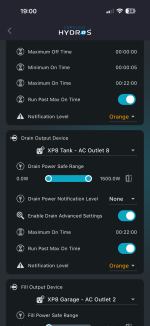
I'm now curious about the advanced settings. For the FILL output device, the minimum and maximum on times seen self evident. I assume that when the schedule time comes around it will run for a minimum of the minimum on time. It will run for a maximum of the maximum on time. I assume this is a safety so it doesn't continue to fill if there were some kind of leak. My question is, what happens if the maximum on time is exceeded and the high level (ATO) sensor still hasn't seen water? Will it stop and generate an alert? Will it just stop and do nothing and no longer run at the next schedule time? Will it still run at the next scheduled time? What does the "run past max on time" switch do? Presumably if this is turned on it will continue to run forever past the max on time but generate an alarm?

The minimum off time is more confusing. If this is only running on a schedule, what good does the minimum off time do? It's going to stay off until after the next drain completes.


My next question is about the ATO function. I've not done enough experimentation to really run down this problem. But after I set this all up yesterday, I was testing things by running the AWC drain output and the AWC fill output manually and watching the high level ATO sensor wet/dry status in the app. What I noticed is that when I turned the ATO output to off and AWC drain output on and started draining water from the sump it needed to drop to the very bottom of the ATO sensor "cube" before it would indicate dry. The sensor cube has 3 engraved lines on it. I assume those correspond to the three detection levels. It would definitely get below the bottom of the lowest engraved line before the status for the sensor in the app would turn to dry. It basically would get all the way to the bottom of the cube.

I would then turn off the drain output and set the AWC back to auto. This would kick on the ATO output and start to fill. But it generally seems to fill too much and doesn't turn off the pump (according to the app) until it gets very close to the overflow kicking on. Sometimes it actually trips the overflow and generates an alarm. Not sure what may be going on here. I do have a suspicion on the overfilling. But is the bottom of the cube the dry level or the lowest engraved line?

 
Is there a time stamped log of alerts, levels, and reasons? When I go to the logs and choose the dropdown I see all my outputs but no way to see an alert log. I'm trying to see how long after the ATO stops filling that I'm getting the overflow alert.
 
Is there a time stamped log of alerts, levels, and reasons? When I go to the logs and choose the dropdown I see all my outputs but no way to see an alert log. I'm trying to see how long after the ATO stops filling that I'm getting the overflow alert.
The alerts are usually a push notification. I get them on my iPad and my phone but the iPad will usually get them several minutes before my phone gets them. There is a day and time stamp on the alerts. The bottom sensor is the dry sensor, the middle sensor is the full sensor and the top sensor is the overflow sensor. the bottom and middle sensor are integrated in to a single sensor that is either wet or dry. The third is only for alert. Only one input per sense port can be used for control purposes.
 
Not trying to use them for control purposes just trying to understand if the sensors are at the level of the engraved lines or not. I do get the push notifications but nice to see a log of the events. Is there not one?
 
Not trying to use them for control purposes just trying to understand if the sensors are at the level of the engraved lines or not. I do get the push notifications but nice to see a log of the events. Is there not one?
The only logs are for outputs. Inputs have graphs but only one per input.
 
Back
Top