
Wifi Quad - I set light schedule but outputs seem to "ignore" off setpoint.

  • Thread starter Thread starter Smite
  • Start date Start date
  • Tagged users None

Users Who Are Viewing This Thread (Total: 0, Members: 0, Guests: 0)

Smite

New member
Joined
Oct 12, 2025
Messages
4
Reaction score
0
Location
Garden Grove, Ca
Hey all, I recently set up a x3/quad outlet bundle on my reef. It replaced my apex that failed.

Set up was very straight forward. All I'm attempting to control are my lights at this point. I set the as Simple Lights > LED>set the schedule>set a high temp safety setpoint then saved the schedules. I set my timezone as well. I placed both outputs in auto. Blue came on as expected the next day, as did whites a few hours later. My problem lies with them ignoring the end set point to turn off. both will stay on indefinitely if I don't manual override them to off.
They quad shows as responding always, so it's not like it's not connected. I can override the outputs it and it works every time.

ive tried resetting the quad outlet by killing power and reseting.
I tried to reboot the x3 in options
I've erased the outputs and re programmed them and same issue.IMG_2265.PNG
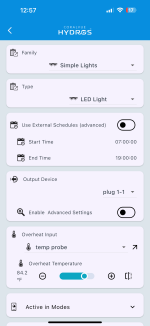
I was hoping to control my heater with the x3 but until I gain some faith in it operating lights, I'm very hesitant to do so.

Thanks for any guidance,

Matt
 
Have you tried setting it to external schedule and then setting up a schedule in schedules in the left menu and see if that acts any different? Also if you use a wifi outlet for a heater make sure there is a thermostat you can set on your heater as a backup off. If there is a communications issue between the controller and the wifi strip the strip will remain in whatever state it is in until communications is restored. I do not use them for anything critical like ATO, AWC or dosing. I have used heaters on the, but I had heaters with thermostats that I set about 3 degrees higher than the Hydros turn off set point. I have since got XP8's for heaters and pumps.
 
Can't see the full output config. There's a Depends On config parameter off the bottom od the screenshot which COULD be causing issue. Do you happen to have something configured there with an ON if somethinf dependency mode? This Depends On will supercede any inputs and schedules.

OR... Does the light eventually turn off and on just at the incorrect times? Check below your left dropdown then OPTIONS to be sure you have the timezone set correctly.

Lastly, is the output led red saying NOT RESPONDING? Wifi feeder, plug and strip accessories have zero inteligence to make output state changes on their own. They rely on the collective master to instruct them to turn off and on. If communication with the master is down, the wifi strips will remain in the state they were upon disconnect until connectivity is restored.
 
Have you tried setting it to external schedule and then setting up a schedule in schedules in the left menu and see if that acts any different? Also if you use a wifi outlet for a heater make sure there is a thermostat you can set on your heater as a backup off. If there is a communications issue between the controller and the wifi strip the strip will remain in whatever state it is in until communications is restored. I do not use them for anything critical like ATO, AWC or dosing. I have used heaters on the, but I had heaters with thermostats that I set about 3 degrees higher than the Hydros turn off set point. I have since got XP8's for heaters and pumps.
Thats a good point. I do usually use Jager heaters but currently I have a BRS Titanium, so that could be disastrous if that happens. Thanks for the heads up on that.
I haven't tried to set an external schedule yet. I'll look into that and see if it works. It's just very odd, on times are correct then just doesn't shut off
 
Can't see the full output config. There's a Depends On config parameter off the bottom od the screenshot which COULD be causing issue. Do you happen to have something configured there with an ON if somethinf dependency mode? This Depends On will supercede any inputs and schedules.

OR... Does the light eventually turn off and on just at the incorrect times? Check below your left dropdown then OPTIONS to be sure you have the timezone set correctly.

Lastly, is the output led red saying NOT RESPONDING? Wifi feeder, plug and strip accessories have zero inteligence to make output state changes on their own. They rely on the collective master to instruct them to turn off and on. If communication with the master is down, the wifi strips will remain in the state they were upon disconnect until connectivity is restored.
The "Depends On" section has "unused" selected in the drop down menu.

When I look at the led on the Quad itself, the ring is orangish red. When I look in the app under status, Wifi Devices shows "plug 1" the name of the quad, as responding in green. Is the LED on the quad showing me a connectivity issue? I can override the bars at anytime and they respond, which had me thinking connectivity is fine.
 
I still haven't been able to get it to function properly. I'll be contacting support. If it gets resolved, I'll share here.

Thanks for the input so far.

Matt
 
I still haven't been able to get it to function properly. I'll be contacting support. If it gets resolved, I'll share here.

Thanks for the input so far.

Matt

OR... Does the light eventually turn off and on just at the incorrect times? Check below your left dropdown then OPTIONS to be sure you have the timezone set correctly.

Do your lights eventually turn on and off just at the incorrect times? Have you checked your timezone setting yet?
 
Back
Top