Firmware 341 / App 3.0.2 (303)

  • Thread starter Thread starter Carlos
  • Start date Start date
  • Tagged users None

Users Who Are Viewing This Thread (Total: 0, Members: 0, Guests: 0)

Carlos

Administrator
Staff member
Joined
Apr 4, 2020
Messages
2,268
Reaction score
851
Location
HYDROS Lab
New firmware 341 and App 3.0.2 (303) are now available.

The firmware is compatible with all HYDROS Controllers, including the IceCap WiFi Controller.

IMPORTANT:
  • NEVER, EVER, EVER update your firmware if you are not in the same location as your controller.
  • CHECK YOUR OVERRIDES! After a firmware update, always check your inputs, outputs, schedules, and overrides.
  • If everything looks good, please upload the changes after updating the firmware.

Installation Instructions:

Step 1: Download the new version of the app from your app store
Step 2: Download and install the latest firmware version. You must first download App version 3.0.2 (303) before updating to the newest firmware version.

Please visit the CoralVueHYDROS.com website for more in-depth instructions on downloading and installing the new firmware.

Full Changelog
 
If you have any issues with the “update config” bar not going away after updating. Or static inputs showing none. Or iV inputs showing red. Use the web app at CoralVue HYDROS App and upload your changes there and see if that fixes your issues.
 
New firmware 341 and App 3.0.2 (303) are now available.

The firmware is compatible with all HYDROS Controllers, including the IceCap WiFi Controller.


Installation Instructions:

Step 1: Download the new version of the app from your app store
Step 2: Download and install the latest firmware version. You must first download App version 3.0.2 (303) before updating to the newest firmware version.

Please visit the CoralVueHYDROS.com website for more in-depth instructions on downloading and installing the new firmware.

Full Changelog
After updating the “schedule” “days of week” selection is not functional. I had scheduled dosing certain days of the week….
 
First post and new convert here!

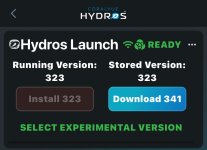
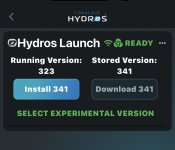
I’m having an issue updating to 341
I download through the app or desktop and when I click install after the update it reboots and then ask me to redownload.
IMG_2759.jpeg
IMG_2755.jpeg

I’ve tried rebooting the Launch 3 times in the app and once physically by removing power, any suggestions?
 
First post and new convert here!

I’m having an issue updating to 341
I download through the app or desktop and when I click install after the update it reboots and then ask me to redownload.
View attachment 4454
View attachment 4455

I’ve tried rebooting the Launch 3 times in the app and once physically by removing power, any suggestions?
There is a new app/firmware that will be out later today that should fix this issue. For now use the web-app for the previous version. CoralVue HYDROS App
 
Both 341 and 342 firmware are not seeing the "Triple Water Level" sensor (Returns unknown to the collective). Switching the sense port to "Optical Water" Sensor the controller reads the input as wet only, whether the sensor itself is wet or dry. Is there something I am missing? .
 
Both 341 and 342 firmware are not seeing the "Triple Water Level" sensor (Returns unknown to the collective). Switching the sense port to "Optical Water" Sensor the controller reads the input as wet only, whether the sensor itself is wet or dry. Is there something I am missing? .
Reboot your collective or controller, then get the sensor wet once
 
Both 341 and 342 firmware are not seeing the "Triple Water Level" sensor (Returns unknown to the collective). Switching the sense port to "Optical Water" Sensor the controller reads the input as wet only, whether the sensor itself is wet or dry. Is there something I am missing? .
The triple level sensor communicate on the digital input of the sense port and the optical sensor is on the analog input so if you set it up for the wrong one it will not communicate at all. A open on the analog is seen as wet. That is how my float switches were originally connected as a optical sensor. There s a float switch input now for the sense ports so all I did was change it from optical to float switch. I did not need to change anything else for it to work as a float switch. If I disconnect a float switch input it will show as wet. It has to be connected to show dry if it is out of the water.
 
I can’t seem to select which day of the week I want to perform an AWC. All days are selected and can not delect any.
 
Hitting update on the Web app seems to have fixed the issue I was having on the Android app always showing yellow update bar and showing the IV stuff as unconfigerd. Interestingly it changed the name IV to IV-2. Always fun
 
Hitting update on the Web app seems to have fixed the issue I was having on the Android app always showing yellow update bar and showing the IV stuff as unconfigerd. Interestingly it changed the name IV to IV-2. Always fun
+1 for IV-2 renaming
 
Hitting update on the Web app seems to have fixed the issue I was having on the Android app always showing yellow update bar and showing the IV stuff as unconfigerd. Interestingly it changed the name IV to IV-2. Always fun
You probably had another item name IV. You can only use a name once. The new app and firmware are enforcing that by changing the name if there is another item with the name. I had several that were change and had to go and relink reference to the ones where then names were changed. So make sure that any other outputs that might use the one that had the name change did not get change to none.
 
I tried to update my firmware on my control4. Now it is flashing red and white, is in responsive and I accidentally deleted the device from the app. Now I can’t see it when I try to reconnect. What should I do?
 
Back
Top