- Admin
- #1

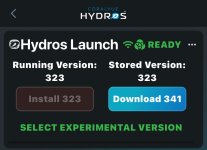
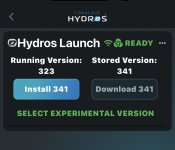
New firmware 341 and App 3.0.2 (303) are now available.
The firmware is compatible with all HYDROS Controllers, including the IceCap WiFi Controller.
Installation Instructions:
Step 1: Download the new version of the app from your app store
Step 2: Download and install the latest firmware version. You must first download App version 3.0.2 (303) before updating to the newest firmware version.
Please visit the CoralVueHYDROS.com website for more in-depth instructions on downloading and installing the new firmware.
Full Changelog
The firmware is compatible with all HYDROS Controllers, including the IceCap WiFi Controller.
IMPORTANT:
- NEVER, EVER, EVER update your firmware if you are not in the same location as your controller.
- CHECK YOUR OVERRIDES! After a firmware update, always check your inputs, outputs, schedules, and overrides.
- If everything looks good, please upload the changes after updating the firmware.
Installation Instructions:
Step 1: Download the new version of the app from your app store
Step 2: Download and install the latest firmware version. You must first download App version 3.0.2 (303) before updating to the newest firmware version.
Please visit the CoralVueHYDROS.com website for more in-depth instructions on downloading and installing the new firmware.
Full Changelog