

I am trying out the new AWC output on my freshwater tank. I can make the ATO work & I can make the AWC work, but I can not make the AWC/ATO work because I can not use the same output for both the Fill and ATO function. Since freshwater means my ATO and Fill water are the same source, I would like to only have 1 pump to deal with both operations. I understand that filtering out the outputs from being selected multiple times can act as a safety precaution and prevent confusion. I propose adding a checkbox to designate when the ATO and Fill are to use the same output. Perhaps right below the Drain output field?
Navigation
Install the app
How to install the app on iOS
Follow along with the video below to see how to install our site as a web app on your home screen.
Note: This feature may not be available in some browsers.
More options
You are using an out of date browser. It may not display this or other websites correctly.
You should upgrade or use an alternative browser.
You should upgrade or use an alternative browser.
Freshwater ATO/AWC
- Thread starter Capsaicin
- Start date
- Tagged users None
Users Who Are Viewing This Thread (Total: 0, Members: 0, Guests: 0)
Additional Thought: Would it be possiable to trigger mode transitions based on mode & sensor input? Sometimes, I do a deep cleean of my sump and use additional pumps to move as much water into my return chamber as possiable to clean out debris. Initial thought was to create a "Deep sump clean" mode that would trigger an AWC cycle while turning on the other pumps. The additional pumps turn off after a timer/sensor triggers so the Drain pump can eventually complete its job and trigger the Fill pump. Ideally, the system would return to Normal mode after the Fill output completes its job.

I am trying out the new AWC output on my freshwater tank. I can make the ATO work & I can make the AWC work, but I can not make the AWC/ATO work because I can not use the same output for both the Fill and ATO function. Since freshwater means my ATO and Fill water are the same source, I would like to only have 1 pump to deal with both operations. I understand that filtering out the outputs from being selected multiple times can act as a safety precaution and prevent confusion. I propose adding a checkbox to designate when the ATO and Fill are to use the same output. Perhaps right below the Drain output field?
If your source is the same for both, why do you need an AWC feature? Just let the ATO fill up the tank after you are done cleaning/removing water
That is what I tried to do. I created a AWC output with only the Drain and ATO fields populated. When I ran the test schedule, the system attempted to use the Fill output. It ran for a bit and threw me a warning. I had to manually override the ATO output and turn if off after filling.If your source is the same for both, why do you need an AWC feature? Just let the ATO fill up the tank after you are done cleaning/removing water
Right now, I am trying to create manually triggered mode as a temporary solution. The mode would run run the drain operation and time out back to Normal operation, causing the ATO to take over. Using a mode does defeat the scheduling feature of an AWC.

Danny
HYDROS Expert
I think the intention was for you to use a generic output with a schedule and the normal ATO output. The only thing I can see with that is it would require a longer max on time during a top off after the water was removed by the generic output than it would normally be set for. Just set the depends on for the ATO to the drain output and set it to off if on. If you already have a depends on set on the ATO you can use a combiner output and combine them then use the combiner for the depends on setting.That is what I tried to do. I created a AWC output with only the Drain and ATO fields populated. When I ran the test schedule, the system attempted to use the Fill output. It ran for a bit and threw me a warning. I had to manually override the ATO output and turn if off after filling.
Right now, I am trying to create manually triggered mode as a temporary solution. The mode would run run the drain operation and time out back to Normal operation, causing the ATO to take over. Using a mode does defeat the scheduling feature of an AWC.
That is what I tried to do. I created a AWC output with only the Drain and ATO fields populated. When I ran the test schedule, the system attempted to use the Fill output. It ran for a bit and threw me a warning. I had to manually override the ATO output and turn if off after filling.
Right now, I am trying to create manually triggered mode as a temporary solution. The mode would run run the drain operation and time out back to Normal operation, causing the ATO to take over. Using a mode does defeat the scheduling feature of an AWC.
Ya I guess I am just not understanding your setup well or why you need the AWC feature (which is meant to hold back fresh top off water while new saltwater is being pumped out/in) vs just turning on a pump to drain (either when you manually plug it in, use a siphon, or even just set up a pump on a schedule on the hydros) and letting the ATO trigger on its own to refill with new freshwater.
Most freshwater AWC systems I have seen just pump water in daily and let the excess old water overflow into a drain, so it only needs one pump total. Doesn’t sound like that works in your situation but that’s just what I am used to seeing.
That would work with a single daily water change. I do not see any controls to do fancier scheduling with the generic output. I can make this work as a work around. I do think the origional ask still stands due to the notification and scheduling differences. (I would want my max on time for the ATO to be smaller than the Fill. In the event of a problem, I like my floors dry.)I think the intention was for you to use a generic output with a schedule and the normal ATO output. The only thing I can see with that is it would require a longer max on time during a top off after the water was removed by the generic output than it would normally be set for. Just set the depends on for the ATO to the drain output and set it to off if on. If you already have a depends on set on the ATO you can use a combiner output and combine them then use the combiner for the depends on setting.
My system uses a pump to drain. I ran a line from my sump out to a pressure pump my yard for irrigation. The pump is needed due to the line lengths and lack of elevation drop over the distance. I tried passive draining for a bit. It was too finicky to trust.Ya I guess I am just not understanding your setup well or why you need the AWC feature (which is meant to hold back fresh top off water while new saltwater is being pumped out/in) vs just turning on a pump to drain (either when you manually plug it in, use a siphon, or even just set up a pump on a schedule on the hydros) and letting the ATO trigger on its own to refill with new freshwater.
Most freshwater AWC systems I have seen just pump water in daily and let the excess old water overflow into a drain, so it only needs one pump total. Doesn’t sound like that works in your situation but that’s just what I am used to seeing.
Danny
HYDROS Expert
I used the generic to do three water changes a day before i went to using the dosing pump schedule. Did you enable advanced settings? Below is a screenshot of a generic output setup to come on once every hour for 10 minutes.
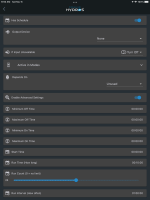
The other reason I do not use an overflow drain is the efficiency of the change itself. It takes less water to reach the same dilution ratio if the old water is removed first instead of pushing it out using an overflow.My system uses a pump to drain. I ran a line from my sump out to a pressure pump my yard for irrigation. The pump is needed due to the line lengths and lack of elevation drop over the distance. I tried passive draining for a bit. It was too finicky to trust.
I conpletely forgot about the advanced settings. My bad. This would work for more frequent water changes. Do you know how this could be configured for every other day or once a week?I used the generic to do three water changes a day before i went to using the dosing pump schedule. Did you enable advanced settings? Below is a screenshot of a generic output setup to come on once every hour for 10 minutes.
View attachment 1600
Danny
HYDROS Expert
You could use a simple doser output then use the schedule. The doser output uses a dosing amount instead of time. But you could use a flow rate and flow amount that would get you the time you want. Just be aware that the max total dose for a day is 500 ml. I use this for my AWC since I use a dual head dosing pump. Below is screenshots of my AWC settings. Since I actually use a dosing pump I divided the actual flow rate by 10 and divided the amount I wanted changed out each day by 10. So the actual amount exchanged is 10 times what the Hydros shows. The schedule is a little more flexible than the generic schedule.
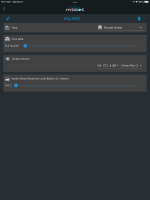
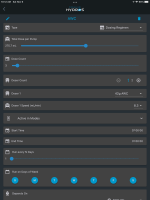
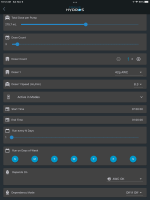
Nice adaptation. I'll take a look at it. What do you have in the AWC OK?You could use a simple doser output then use the schedule. The doser output uses a dosing amount instead of time. But you could use a flow rate and flow amount that would get you the time you want. Just be aware that the max total dose for a day is 500 ml. I use this for my AWC since I use a dual head dosing pump. Below is screenshots of my AWC settings. Since I actually use a dosing pump I divided the actual flow rate by 10 and divided the amount I wanted changed out each day by 10. So the actual amount exchanged is 10 times what the Hydros shows. The schedule is a little more flexible than the generic schedule.
View attachment 1601
View attachment 1602
View attachment 1603
(Thinking about how I would adapt this approach to use a low water level sensor.)
Danny
HYDROS Expert
Here is the AWC OK output Screenshots.
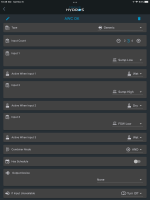
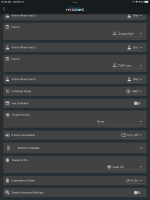
Ah. You created a virtual device to control the safety state. Cool. I'll see what I can cook up on my system. Thank you.
That said, do you see this as a replacement for my origional request for the AWC functionality to support the Fill and ATO pump being the same? Or as a workaround till the functionality is baked in the AWC function?
That said, do you see this as a replacement for my origional request for the AWC functionality to support the Fill and ATO pump being the same? Or as a workaround till the functionality is baked in the AWC function?
Danny
HYDROS Expert
This is just my work around since I use a single pump for both drain and fill. I tried using the AWC also and the issue was it would shut off the ATO until the full sensor was met. Unfortunately the only way for that to happen was for the ATO to run. A similar issue to what you were having. If they do setup something for freshwater use as you suggest it may also work for my purpose.Ah. You created a virtual device to control the safety state. Cool. I'll see what I can cook up on my system. Thank you.
That said, do you see this as a replacement for my origional request for the AWC functionality to support the Fill and ATO pump being the same? Or as a workaround till the functionality is baked in the AWC function?
Danny
HYDROS Expert
I am thinking and wonder if a check box could be added to assign the same output port to both ATO and Fill pump and still keep the advanced settings separate for the two. That way you can allow more time for refill on the fill than the ATO. I have no idea if this would be possible or how hard it would be to do. It is just a thought. I think that would work for both of our cases.Ah. You created a virtual device to control the safety state. Cool. I'll see what I can cook up on my system. Thank you.
That said, do you see this as a replacement for my origional request for the AWC functionality to support the Fill and ATO pump being the same? Or as a workaround till the functionality is baked in the AWC function?
Not having seen the code base, It should be a fairly straightforward tweak in the code. Add a section in the UI to present the checkbox & persist. Show hide the box based on if the Fill output is populated. Anywhere the Fill output is retrieved, instead of reference a new method that checks the checkbox and returns either the ATO or Fill output.I am thinking and wonder if a check box could be added to assign the same output port to both ATO and Fill pump and still keep the advanced settings separate for the two. That way you can allow more time for refill on the fill than the ATO. I have no idea if this would be possible or how hard it would be to do. It is just a thought. I think that would work for both of our cases.
(There is a reason they have declined to let me code for them.
 )
)