

JeffB418
HYDROS Expert
This DIY tutorial shows you how to run some 36VDC devices (like the Varios 6/8) on a Kraken Force (24V) port. Note: this is a DIY method and please understand everything in this guide before attempting, failure to do so could damage your equipment. Coralvue, nor I, take any responsibility. Got it? Ok good, proceed.
Theory: You will use an external device called a DC to DC booster. This device takes a lower DC voltage and "boosts" it or increases it to a higher voltage. I have found a unit that will take a wide input voltage range (9V-32V) and output a constant 36V. This wide voltage input range covers not only the standard Force Port voltage of 24V but also 12V that a Force Port outputs while on battery power (if you enable that port during battery mode).
Considerations: This adds an additional external device to power your item. Also you must be aware of power draw of your device, plus understand current draw at different input powers. The device shown here can power MAX of 5A at 36V or 180W, but I highly recommend keeping your 36V device power draw under 90W otherwise you can get into issues with exceeding power limits elsewhere (see below in battery power considerations section).
Concept: In short, you will have a cable from your Kraken Force port, to the DC/DC booster, then to your 36V device. In this example we are powering a varios 8 pump controller.

Wiring:
- For wiring from the Force Port to the DC/DC Booster, use a standard Coralvue Force Cable (HYDROS Force Port 24v Adapter Cable), this cable allows you to connect either a male or female DC barrel (5.5x2.1) connector, just remove the included adapter if you want to use the male version.
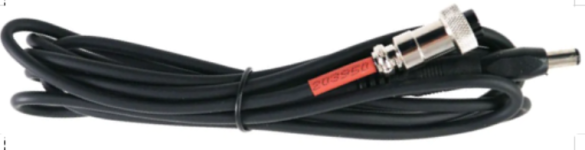
- For the DC/DC Booster, I will show you how to add DC barrel connectors to it below. The input side of the DC booster will plug into the above Force Port Cable and the output side will go to your 36V device.
DC/DC Booster:
The DC booster I recommend is this unit: https://a.co/d/bh9umUG (Note the DC/DC booster must have a wide input voltage range that covers both 12/24V)
Then buy 2x of these DC barrel pigtail cables: DC barrel cables
If you are not good at soldering, I highly recommend using these level wire nuts: Lever Wire Nuts
Using the above items, wire up the booster as follows, matching RED wires on the DC barrel cables to the POSITIVE (red or yellow) wires on the booster. Make sure to note that the input side DC barrel connects to the yellow side, and output to the red side. NOTE: since posting this, I have been told that the INPUT and OUTPUT colors VARY between models (and even units) and you MUST make sure which side is the input/output power based on the device you have. They should be marked on the unit you get which is in and out.
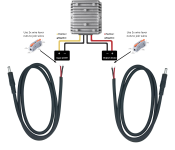
Final Connection Diagram:
Connect your devices as follows:
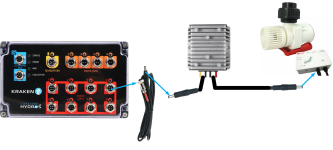
Power/Battery Mode Power Considerations:
Above I recommended to keep 36V devices under 90W just to avoid issues, but this section explains why.
Finally, something VERY important to understand is how power draw works for different source voltages. The output voltage will ALWAYS be the same regardless if you are using a force port in normal 24V mode, or battery 12V mode. Therefore the current draw on the force port itself WILL change based on the voltage mode (12V vs 24V).
For example, if you are running a 36V pump that is running at max power of 180W, that's 5A at 36V. But on the input side of the DC booster, that is actually around 8A at 24V (Power/Voltage=I(current), 180W/24V = 7.5A (plus some loss for the converter, so we round up). Which puts us RIGHT at the max current limit for a Force Port. That is fine though. The issue is if you switch this Force Port on during battery mode, which is 12V. Using the calculation above again, 180W/12V = 15A (plus 0.5A for converter loss), this would cause the pump to pull over 15A at 12V, which is WAY beyond the limit for a Force Port, plus beyond the 10A limit for the battery backup port. So be VERY aware of 24V vs 12V Battery current draw needs when using a booster!
How to get around this issue? A few ways:
1) Don't enable this port/device during battery mode at all. Avoid the 12V use case completely.
2) Run the pump at 50% speed (90w) all the time, this way on normal Force Port mode at 24V, you draw about 4A and on battery you draw about 8A on 12V. This avoids any over current issues completely.
Theory: You will use an external device called a DC to DC booster. This device takes a lower DC voltage and "boosts" it or increases it to a higher voltage. I have found a unit that will take a wide input voltage range (9V-32V) and output a constant 36V. This wide voltage input range covers not only the standard Force Port voltage of 24V but also 12V that a Force Port outputs while on battery power (if you enable that port during battery mode).
Considerations: This adds an additional external device to power your item. Also you must be aware of power draw of your device, plus understand current draw at different input powers. The device shown here can power MAX of 5A at 36V or 180W, but I highly recommend keeping your 36V device power draw under 90W otherwise you can get into issues with exceeding power limits elsewhere (see below in battery power considerations section).
Concept: In short, you will have a cable from your Kraken Force port, to the DC/DC booster, then to your 36V device. In this example we are powering a varios 8 pump controller.
Wiring:
- For wiring from the Force Port to the DC/DC Booster, use a standard Coralvue Force Cable (HYDROS Force Port 24v Adapter Cable), this cable allows you to connect either a male or female DC barrel (5.5x2.1) connector, just remove the included adapter if you want to use the male version.
- For the DC/DC Booster, I will show you how to add DC barrel connectors to it below. The input side of the DC booster will plug into the above Force Port Cable and the output side will go to your 36V device.
DC/DC Booster:
The DC booster I recommend is this unit: https://a.co/d/bh9umUG (Note the DC/DC booster must have a wide input voltage range that covers both 12/24V)
Then buy 2x of these DC barrel pigtail cables: DC barrel cables
If you are not good at soldering, I highly recommend using these level wire nuts: Lever Wire Nuts
Using the above items, wire up the booster as follows, matching RED wires on the DC barrel cables to the POSITIVE (red or yellow) wires on the booster. Make sure to note that the input side DC barrel connects to the yellow side, and output to the red side. NOTE: since posting this, I have been told that the INPUT and OUTPUT colors VARY between models (and even units) and you MUST make sure which side is the input/output power based on the device you have. They should be marked on the unit you get which is in and out.
Final Connection Diagram:
Connect your devices as follows:
Power/Battery Mode Power Considerations:
Above I recommended to keep 36V devices under 90W just to avoid issues, but this section explains why.
Finally, something VERY important to understand is how power draw works for different source voltages. The output voltage will ALWAYS be the same regardless if you are using a force port in normal 24V mode, or battery 12V mode. Therefore the current draw on the force port itself WILL change based on the voltage mode (12V vs 24V).
For example, if you are running a 36V pump that is running at max power of 180W, that's 5A at 36V. But on the input side of the DC booster, that is actually around 8A at 24V (Power/Voltage=I(current), 180W/24V = 7.5A (plus some loss for the converter, so we round up). Which puts us RIGHT at the max current limit for a Force Port. That is fine though. The issue is if you switch this Force Port on during battery mode, which is 12V. Using the calculation above again, 180W/12V = 15A (plus 0.5A for converter loss), this would cause the pump to pull over 15A at 12V, which is WAY beyond the limit for a Force Port, plus beyond the 10A limit for the battery backup port. So be VERY aware of 24V vs 12V Battery current draw needs when using a booster!
How to get around this issue? A few ways:
1) Don't enable this port/device during battery mode at all. Avoid the 12V use case completely.
2) Run the pump at 50% speed (90w) all the time, this way on normal Force Port mode at 24V, you draw about 4A and on battery you draw about 8A on 12V. This avoids any over current issues completely.
Last edited:


