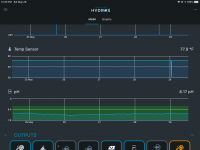
Graph range changed with update

Users Who Are Viewing This Thread (Total: 0, Members: 0, Guests: 0)

Viva'sReef

Member
Joined
Apr 18, 2021
Messages
37
Reaction score
5
Location
Detroit
Is there a way to change the Graph range back to within a smaller sample set?

Example, my PH probe would display a range of 7 low, and 9 high but now it shows a range from 0 low to 10 high.

Temp is now showing a range from 30 low, to 90 high. So the graph just shows a straight line because the range is so far off from my set points.

Anyone else experiencing this? Know how to fix it?
 
The range of the graph is set automatically. Every time I did a firmware update it would cause this until the graphs for the time of the update fall off the graph. In a few days they should be back to where you are used to them being. Also a power down and power back up would also cause this on mine.
 
Is there a way to change the Graph range back to within a smaller sample set?

Example, my PH probe would display a range of 7 low, and 9 high but now it shows a range from 0 low to 10 high.

Temp is now showing a range from 30 low, to 90 high. So the graph just shows a straight line because the range is so far off from my set points.

Anyone else experiencing this? Know how to fix it?
Also have similar issue with temp graph. It used to be a jagged line which accurately reflected the subtle and expected temp variations of my tank. Now it’s just a flat line since the update. If I click anywhere along the line it always says the temp was 77.90 at that time. It never varies now and of course that just isn’t possible. Then the other night I was alerted that my heater exceeded the max off time. I looked at the temp graph and there was a massive downward spike from the normal temp to around 30 degrees in a matter of minutes. Obviously a false reading. Something going on with the temp/heater control since the update.
 
Did you loose power or reset the control unit? That will cause that type of spike. It also changes the range displayed.
 
No. Nothing else to correlate this event with. Inexplicably spiked downward from 78 to 30 in a few minutes and went back up to normal within a few minutes.
 

Attachments

  • F4786D4A-D9D0-4C9C-9A8A-2E50E2B7C0CF.png
    F4786D4A-D9D0-4C9C-9A8A-2E50E2B7C0CF.png
    143 KB · Views: 9
No. Nothing else to correlate this event with. Inexplicably spiked downward from 78 to 30 in a few minutes and went back up to normal within a few minutes.
If that is the case you might want to reseat the sensor plug in case it is a connection issue. I have three of the temp sensors and did not have an issue with them on firmware 186.
 
i will try that and will also delete my temp input and heater output, reboot the C4 and recreate them to see what happens. I really am getting frustrated by the constant problems with this unit. I have a very uncomplicated setup compared to so many of you that do not experience issue after issue. I am starting to think that I have a defective temp probe, C4 or maybe both. I bought this unit in the hopes that it would help me provide my livestock with the very best, safest, environment in which to thrive. I now find myself constantly checking and worrying whether my C4 is wreaking havoc on the very same tank it was installed to protect. I bought the Helios heater system after the last unfortunate C4 episode and was using the C4 only as a backup temp failsafe but it’s proving to be a weak link in that setup also.
 
FYI, the temp sensor is digital. There is a IC in the probe tip. This is usually very reliable since the signal from the chip to to control unit is a digital signal. When troubleshooting this issue don't forget the temp sensor if that is all you are having an issue with.
 
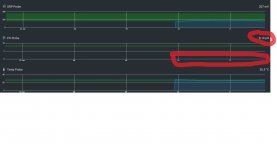
I have a similar problem but with the PH graph, the PH value is correct but the graph is in 0.00
 

Attachments

  • PH Graph.jpg
    PH Graph.jpg
    142 KB · Views: 10
Have you tried restarting the control unit to see if it fixes the problem? Let us know!
 
Back
Top