
Navigation
Install the app
How to install the app on iOS
Follow along with the video below to see how to install our site as a web app on your home screen.
Note: This feature may not be available in some browsers.
More options
You are using an out of date browser. It may not display this or other websites correctly.
You should upgrade or use an alternative browser.
You should upgrade or use an alternative browser.
Graphs in App
- Thread starter Spitts6654
- Start date
- Tagged users None
Users Who Are Viewing This Thread (Total: 0, Members: 0, Guests: 0)

- Admin
- #3

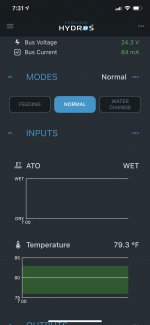
By any chance, did you rename the INPUTS? Try restarting the Control unit and see if that helps.
Let me know,
Let me know,

ppatches24
Member
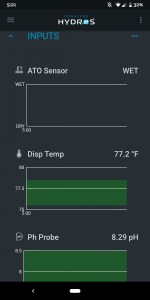
Ive got the same issue, buts its only when I put my control 4 in a collective the graphs don't graph. I've tried to reboot, clear local cache, power cycle, renaming the inputs, nothing gets the graphs showing when in a collective, out of a collect graphs work.
@Carlos
Edit: im on the latest 165 release
@Carlos
Edit: im on the latest 165 release
- Admin
- #5

- Joined
- Apr 23, 2020
- Messages
- 327
- Reaction score
- 128
When a new collective is created the previous graphing information no longer applies. A new collective will never have any graphing information. That will start to fill in over the next hour or so as new data is collected for the new system.
Did the graphing information start to fill in on the new collective after a while? If not we need to look at something more complex.
Did the graphing information start to fill in on the new collective after a while? If not we need to look at something more complex.
ppatches24
Member
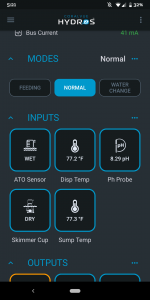
That's what I was hoping. That I was being impatient and the graphs just weren't old enough to show data. But it's been more than a week at this point. When in tile mode everything is showing and updates real time. Flipping back over to graphs. Shows nothing.When a new collective is created the previous graphing information no longer applies. A new collective will never have any graphing information. That will start to fill in over the next hour or so as new data is collected for the new system.
Did the graphing information start to fill in on the new collective after a while? If not we need to look at something more complex.
Attachments
fellowapeman
New member
- Admin
- #8
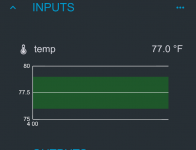
We are sorry for the inconvenience. There is a bug in the graphing and we are aware of it. It is actually fixed on the next version of the firmware and app which we will be releasing later this coming week or early the week after. We are sorry for the inconvenience and ask just for a little patience while we test the new firmware to make sure it is working properly.I just set my Hydros2 up yesterday and noticed that mine is the same. I was expecting it to show a time-based chart with data points, at least every hour?
fellowapeman
New member
We are sorry for the inconvenience. There is a bug in the graphing and we are aware of it. It is actually fixed on the next version of the firmware and app which we will be releasing later this coming week or early the week after. We are sorry for the inconvenience and ask just for a little patience while we test the new firmware to make sure it is working properly.
Not sure if you guys have a known issues or features release timeline page but that would be dope.
Since this is such a new platform, it would create a lot of trust with the customers who are buying into this ecosystem and would create some accountability for the dev team to (attempt) to deliver features on a rough timeline.
Aside from some UI/UX improvements and bug fixes, it seems like the product is off to a great start, so thank you! (although I just realized the Hydros2 doesn't have sense ports! How am I supposed to use my pH sensor
 ... no idea how I overlooked that)
Danny
HYDROS Expert
You can alway add a Control 4 to you Control 2 and you would have the two probe ports and 4 more sense ports along with 4 0-10v input ports. When the controllers are in a collective it acts as one larger controller with all the ports. You can control an output port from one controller with an input port from another. I have both a Control 4 and Control 2 in a collective. I plan on getting another Control 2 since I will be needing another drive port soon.Not sure if you guys have a known issues or features release timeline page but that would be dope.
Since this is such a new platform, it would create a lot of trust with the customers who are buying into this ecosystem and would create some accountability for the dev team to (attempt) to deliver features on a rough timeline.
Aside from some UI/UX improvements and bug fixes, it seems like the product is off to a great start, so thank you! (although I just realized the Hydros2 doesn't have sense ports! How am I supposed to use my pH sensor
fellowapeman
New member
I'm running such a small tank I only needed one controller. I should have bought the control 4 instead so I could have the sense ports as I'd really like to monitor pH.You can alway add a Control 4 to you Control 2 and you would have the two probe ports and 4 more sense ports along with 4 0-10v input ports. When the controllers are in a collective it acts as one larger controller with all the ports. You can control an output port from one controller with an input port from another. I have both a Control 4 and Control 2 in a collective. I plan on getting another Control 2 since I will be needing another drive port soon.
Having a 2 and a 4 is a bit overkill for my needs. I'll have to see if I can do an exchange to swap out the 2 for the 4.
Danny
HYDROS Expert
Sorry didn't intend on posting yet.
fellowapeman
New member
Dang, that's legit! Very clean wiring. I have a waterbox peninsula 15 sitting on an open stand so the fewer wires and peripherals I can manage the better. I kinda wish I had built an enclosed stand so I could hide all the electronics and used wire management like you have. Maybe next time...
Danny
HYDROS Expert
I have a Control 4 and a Control 2. Both are in the garage with my storage tanks. My tank is 35ft away and is a 42 gallon hex tank. I am slowly replacing my other controller equipment. I decided to start in the garage. The old controller is a Archon. It had 9 power bars and 15 various other modules in the system. So a Control 4 and Control 2 are not that much to my system.I'm running such a small tank I only needed one controller. I should have bought the control 4 instead so I could have the sense ports as I'd really like to monitor pH.
Having a 2 and a 4 is a bit overkill for my needs. I'll have to see if I can do an exchange to swap out the 2 for the 4.
Danny
HYDROS Expert
Photos of the system are here.
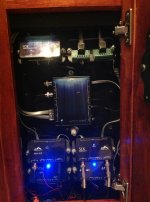
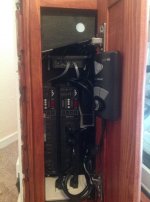
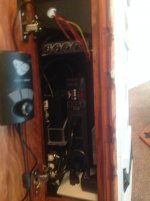
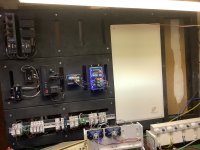
Danny
HYDROS Expert
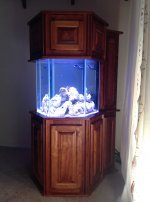
My wife didn't want to see any of the equipment or any of the sand against the glass or the waterline at the top of the tank. I have seperate compartments for the electronics from the sump in the stand and also the canopy. This is a photo 3 months after it was filled.Dang, that's legit! Very clean wiring. I have a waterbox peninsula 15 sitting on an open stand so the fewer wires and peripherals I can manage the better. I kinda wish I had built an enclosed stand so I could hide all the electronics and used wire management like you have. Maybe next time...
FickleSticks
Member
Looks like this was not fixed in the 177 firmware. What a disappointment.We are sorry for the inconvenience. There is a bug in the graphing and we are aware of it. It is actually fixed on the next version of the firmware and app which we will be releasing later this coming week or early the week after. We are sorry for the inconvenience and ask just for a little patience while we test the new firmware to make sure it is working properly.

JeffB418
HYDROS Expert
Graphing should be fixed in 177. How long did you wait after updating? It may take some time for graphing data to show upLooks like this was not fixed in the 177 firmware. What a disappointment.
FickleSticks
Member
It's been three hours. Still nice and flat, like my attitude regarding HydrosGraphing should be fixed in 177. How long did you wait after updating? It may take some time for graphing data to show up
ppatches24
Member
Dang. Updated to 177 thinking it would fix the graphing. Oh well. Back to waiting. Hopefully 177 had good fixes in it? I don't know because there's no release notes. Lol