Only breathing red

Users Who Are Viewing This Thread (Total: 0, Members: 0, Guests: 0)

Eldritch Blast

New member
Joined
Sep 5, 2021
Messages
29
Reaction score
3
Location
Maple Valley
My X2 got disconnected from cloud, internet been troublesome past 24 hours.

Wi-Fi solid again, and trying to get reconnected. Have disconnected from wall and disconnected at terminal. Both flash green twice quick, then immediately start breathing red.
 
Breathing red is no wifi. Is your router ok. You might try rebooting it.

This is no wifi

This is no internet
 
Thanks for quick reply!

Ok, the problem is me not following the directions properly. Struggling to get it set up still but I’m not hitting a wall on that just yet.

Is there a .PDF of f instructions for this or are they only accessible with internet and then printing? Would be easier if I wasn’t always halfway in my sump trying to remember where to find the instructions.
 
You did enter the password for the network? Also did you select a 2.4ghz network. The controller will not work on 5ghz. Also if you want to name the controller do it when you setup the wifi for it. It sounds like it is not connecting for some reason.
 
You did you enter the password for the network? Also did you select a 2.4ghz network. The controller will not work on 5ghz. Also if you want to name the controller do it when you setup the wifi for it. It sounds like it is not connecting for some reason.
Ya I selected my network and entered the password, it connected then said good I though. I assumed it would only offer a 2.4ghz network to select. My router gives both 2.4, and 5. Only showed one channel I assumed that was the 2.4. How to tell? I didn’t have this issue reconnecting when I’ve been kicked from cloud and couldn’t reconnect before.

I will be attempting to do same steps over again, I appreciate your help.
 
Do your 2.4ghz and 5ghz have different names? They need to be different so it does not mistake the two when trying to reconnect.
 
Ok so not sure why this wasn’t a problem before guess it must’ve just been a coin flip as to what it connected to. Probably not as simple as someone with no IT knowledge but seems silly it will even attempt to connect to a 5ghz if it can’t work on it. Really lose a lot of functionally with the 30 other devices I have connected to Wi-Fi that are able to use the best available when I have to rename it. Oh well…anyways now it just says configuration stale. Also looks like I need to reset everything again, because I STILL never logged in from PC to archive my effing settings so I’m guessing the stake configuring means that I need to reconfigure everything?

Am I almost back to normal here?!
 
My head is going to explode. Power strip wasn’t connected. Added it. Not showing up. It’s not there anymore. I’m so irritated I need to step away but I can’t, because the all settings are wiped. These controllers are just simply not for a stupid plumber yet. Still too complicated.
 
I actually don’t think I can’t do anything with this configuration stale click to refresh tag on bottom here. Once I got my BP to a manageable level to try to just set everything up again, there isn’t anyway to upload changes, because it just says configuration stale click to refresh. When I tap that, it boots me back to page to select controller again then just displays the same thing.
 
Upload changes is in the right menu just below device properties. Also every time you change a setting it uploads a archived version of your settings if you ever need to go back to a previous setup. To pair the wifi strips after changing the name of your wifi channel use replace for that wifi strip and it should replace it with itself without changing any settings.
 
Hang in there, there is a learning curve with any controller. The more you use it and try things the more you will learn how things work.
 
Ya not sure what the problem is here. I am lost. Must be something up with my ISP I’ve done all the suggested things, and done them properl. I’m not having any connection issues with any other devices though so I’m lost.

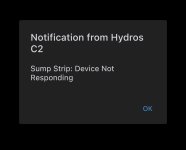
Powestrip gets connected fine, then loses connection or can’t be reached or whatever it says. Nothing working through the strip.
 
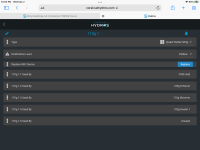
Did you change the name of the 2.4ghz channel or the 5ghz channel? If it was 2.4ghz you can use the replace sequence to pair the wifi strip with the controller on the wifi with the new name. Make sure the device you are using to pair with is also on the 2.4ghz channel. In the left menu click on wifi devices and then click on the one you want to pair and select replace. Below is a screenshot of the app after selecting a wifi strip.

B4E74B8E-04D0-4D37-8622-C34C81E9DEAF.png
 
My strip just will not connect or stay connected. I don’t know if it’s stuck on the old Wi-Fi name some how or what. I have deleted it added a new one, I removed every single output and as soon as I got everything set up again, the power strip disconnected.

Every output and the strip is NOT RESPONDING
 
Here is a video of me doing your above mentioned step. Nothing responding. I did move the X2 to the 2.4 Wi-Fi network that I renamed

 
“Make sure the device you are using to pair with is also on the 2.4ghz channel”

This must be it dang it too worked up didn’t notice that. Going to try this now.
 
I cannot see the video. I usually suggest renaming the 5ghz so you don't have the issue of setting up each item you have again with the new name. Usually there is less to worry about with the 5ghz channel. Most of the things on 5ghz will work on 2.4 until you get them changed to the new name. The replace should show the wifi strip to choose from when replacing. if You know which on press and hold the power button for several seconds then it should be flashing so you are able to pair it. The instructions for replacing are in appendix C in this link HYDROS Control 4 - How to Pair WiFi Strip/Smart Outlet
 
I cannot see the video. I usually suggest renaming the 5ghz so you don't have the issue of setting up each item you have again with the new name. Usually there is less to worry about with the 5ghz channel. Most of the things on 5ghz will work on 2.4 until you get them changed to the new name. The replace should show the wifi strip to choose from when replacing. if You know which on press and hold the power button for several seconds then it should be flashing so you are able to pair it. The instructions for replacing are in appendix C in this link HYDROS Control 4 - How to Pair WiFi Strip/Smart Outlet
I really have followed all steps properly I feel like, and all of my outputs and the strip are red in status screen, and not responding.

I give up. Pulling heaters and cleaning off all my pineapple sponges so I can set the thermostats correctly.

I completely removed all outputs. Deleted them. Deleted the strip. Done everything like 20 times. Still end up with this every time.
 

Attachments

  • 89FF9FDB-8C1E-489A-A3EC-4A6B9E3FAF59.jpeg
    89FF9FDB-8C1E-489A-A3EC-4A6B9E3FAF59.jpeg
    107.4 KB · Views: 1
Back
Top