Power bar connection help !

  • Thread starter Thread starter K519
  • Start date Start date
  • Tagged users None

Users Who Are Viewing This Thread (Total: 0, Members: 0, Guests: 0)

K519

New member
Joined
Jan 10, 2022
Messages
19
Reaction score
3
Location
Ontario, Canada
i cant connect to wireless power bar. i have a tplink mesh system. seperated it into 2.4g and 5g access points as sugested. Rebooted router and controller. Controller is connected to 2.4g network. I follow instructions on connecting from the “Cvtv live product workshop - hydros wifi controllable outlets “ . Carlos mentions if the light on powerbar is already blinking more then 1 blink per sec i can skip holding the button. My button is already blinking so i go to connect. it tries to connect then i get one of 3 scenario
1. Link failed
2. Link failed and linker timed out
3. Linker idle

i deleted controller from app then reconected as new controller. reconected on 2.4g wifi. Made sure my mobile device is also on the same 2.4g wifi. tried to follow all the steps from the video and HYDROS Control 4 - How to Pair WiFi Strip/Smart Outlet. Still same outcome. When i go to add wifi devices i make sure the power bar is unplugged. Follow direction for when to plug it in. then im supposed to press the button to make it blink fast, but the button is already blinking fast. I tries to connect, does the countdown. Then same outcome as above.

im not sure what else to do.
 
Another thing to try is turning off the 5ghz channel on your router while pairing.
 
Will try that now. I was just replying to you on other thread but i started this one aswell to be more specific. If you meant my mobile device on 2.4g then yes it is. I deleted 5g wifi network from my mobile aswell just incase it tries to conect there. The controller is only connected to 2.4g. Power bar wont connect to anything.

I will try turning off 5g from my router and reboot controller and try the process again.
 
Will try that now. I was just replying to you on other thread but i started this one aswell to be more specific. If you meant my mobile device on 2.4g then yes it is. I deleted 5g wifi network from my mobile aswell just incase it tries to conect there. The controller is only connected to 2.4g. Power bar wont connect to anything.

I will try turning off 5g from my router and reboot controller and try the process again.
You should not have to reboot the controller if it is communicating.
 
hey thanks that worked to connect it. But now that im able to connect. I press the green bar to save/upload changes. It shows up on my status page. But shows not responding.
 
Im going to give some extra detail maby im making a mistake an thats why there is issues. i have a tplink router wifi 6 mesh all that stuff. On it i can have the main network and guest networks.

What i first tried was keeping the main network unchanged and adding a guest network. On the guest network i disabled 5g to only allow 2.4g. On the Controller it showed my mainnetwork 2.4/5g and it showed my guest network 2.4g. I connected to guest2.4g and set up temp probe ph probe. no conectivity issue for controller. No losing connection

I was not able to connect power bar in this way. So i made this thread.

after your advice i disabled 5g completly on the main network aswell. I rebooted and reconected controller. Controller showed main network2.4g and guest network 2.4g. At this point 5g is disabled on both guest and main network. I connected to guest2.4g. No issue. I paired the wifi power bar to controler following instructions and i was succesful. I press the green bar on the bottom to upload changes.

now when i go to my status page under wifi devices i can see “a” which is what i named the power bar.
it shows “a not responding”

is there a way to fix this ?
also if there is. Will i be then able to enable 5g on the main network. The controller would still be conected to the guest2.4 network.

at this point i think the multiple networks from 1 router even though both are 2.4g, are confusing the power bar. Im guessing i wont be able to use this configuration of mainnetwork 2.4/5g for the rest of my household devices. And guestnetwork2.4g for the controler And power bar

if none of the above works then i think my only option is to use a wifi extender as an access point and only allow 2.4g on the extender and then connect to that network. am i correct ?
 
The guest network has a different name than your main network? The Hydros and wifi6 and mesh networks don't get along well. You may be able to get it to work with it. Most of the time it is suggested to get a Access point with 2.4ghz only setup and an different name form the main network. Hook the AP to the router with a wired connection. Don't use wifi to connect it to the router.
 
making sure i understand. Using my current setup wont work. i should get a wifi extender, plug that beside router and conect it to the router using lan cable. Then go into setting of the wifi extender and make it an access point only allowing 2.4g. Give that access point a seperate name. Connect hydros to that new network and all should be good ?


I kind of feel like that is what ive already done by making a new “guest network“ that only allow 2.4g. The only difference will be that im using another device to relay the network to the hydros instead of my router.
If thats the only other thing to try then i will try it. maby theres something im missing and not understanding about how all this mesh stuff works but i feel like by making a seperate 2.4g guest network on my current router that should avoid the mesh issue.

this seems alot harder then it should be but i really want it to work. I kind of feel like a newish device like hydros should be compatible with newer technology and not still rely only on 2.4g. Thats a different issue and if i can get it working then i guess it doesnt matter. Just not the greatest experience so far. still id rather get this going because really dont want to keep using super old reefkeeper lite.
 
You may be able to get it to work but if not that is another thing you can do. You do have a different name for the guest network. Also some guest networks can be limited so that might or might not be an issue. One person with a WiFi6 mesh had to set the 2.4ghz to 802.11b mode to get theirs to even setup. Unfortunately they change things on the new model of routers all the time and it can cause unintended issues. There are so many different routers now it would be impossible to try things on every one there is. I just looked my router up and it is 802.11ac. I am guessing that is an earlier version.
 
Last edited:
One thing I've notice that just having the Control on the 2.4 network is not enough. When I go to connect a new wifi device to the control my phone has to be connected to the same 2.4 ghz network.
 
i made sure my mobile device (ipad) is on same 2.4guest as controller. I made it “forget” all other wifi networks So it wouldnt interfere or switch by itself. so i dont think that was it.
also when i set up the 2.4g guest network i allowed it access to my lan network so i dont think that was it either.

could be something with different standards of 2.4g and that 802.1ac etc like you mentioned.
i knew a little bit about this stuff and forced to learn more tonight.
I read something about dhcp maby having to do something with it but im getting info overload.

same time as posting this thread i sent a support ticket aswell. Coincidently right around 5pm. i think within 20min i got a response. Result of back and forth was.


“You cannot connect to a guest network. If you do that, then the controller will not see the WiFi strips. The WiFi needs to allow the controller and the strips to see each other. If not, it won't work. If you add them to a guest network, the devices can see the internet but not see each other.

---
Sincerely,
Carlos Chacon”

i still dont fully understand but atleast he told me it wont work and instead wasting my time to keep trying this ill just try setting up a seperate access point. i appreciate and thank carlos for the fact that he answers support tickets himself or atleast through his account and we exchanged a few emails since 5pm which is after hours. What i wanted to work still doesnt work but i didnt have to spend a week waiting for answers. at the very least ive gotten great service. and hopefully once i set up an access point ill be just as happy with the product.
thanks to you members aswell for helping and quickly too.
 
Update. after more reading i realized i can turn an old router into access point. I had an old router. I turned that into access point and made a new network 2.4g only. So far so good no issues. I disconected mobile device from wifi and still able to use app from cellular connection so no issues there either. Im happy now and can sleep. Tomorow start to move over equipment from reef keeper. thanks again.
 
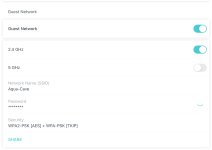
Not sure if this helps, but I am also using TP-Link mesh with 2.4 guest network for my Hydros. The controller is the only thing on this network and everything is working fine for me… X2 with wifi 4 outlet strip, temp sensor and Hydros doser. I’ve attached a screenshot of my settings to see if you have something different… Hope it helps
 

Attachments

  • F05EF527-22B5-4CE2-82F7-D3AABE5001F4.jpeg
    F05EF527-22B5-4CE2-82F7-D3AABE5001F4.jpeg
    194 KB · Views: 5
Interesting. I really tried everything i could think of with help from support and here and couldnt get it to work. Didnt make much sense to me and not sure why it wasnt working for me. I did the same disabled 5g on guest and allowed access to lan. Maby something in advance setting is different or i dont know. I spent easy 7hr yesterday back and forth trying to figure it out so i could avoid the access point. I dont know what that says about me….

I set it up with a old router as access point and im happy with that now. Also none else will use that network so no congestion if that even matters. so far so good havnt had any connection issue.

thanks for trying to help out though.
 
Interesting. I really tried everything i could think of with help from support and here and couldnt get it to work. Didnt make much sense to me and not sure why it wasnt working for me. I did the same disabled 5g on guest and allowed access to lan. Maby something in advance setting is different or i dont know. I spent easy 7hr yesterday back and forth trying to figure it out so i could avoid the access point. I dont know what that says about me….

I set it up with a old router as access point and im happy with that now. Also none else will use that network so no congestion if that even matters. so far so good havnt had any connection issue.

thanks for trying to help out though.
Glad you at least have it working!
 
Back
Top