K519
New member
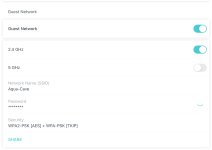
i cant connect to wireless power bar. i have a tplink mesh system. seperated it into 2.4g and 5g access points as sugested. Rebooted router and controller. Controller is connected to 2.4g network. I follow instructions on connecting from the “Cvtv live product workshop - hydros wifi controllable outlets “ . Carlos mentions if the light on powerbar is already blinking more then 1 blink per sec i can skip holding the button. My button is already blinking so i go to connect. it tries to connect then i get one of 3 scenario
1. Link failed
2. Link failed and linker timed out
3. Linker idle
i deleted controller from app then reconected as new controller. reconected on 2.4g wifi. Made sure my mobile device is also on the same 2.4g wifi. tried to follow all the steps from the video and HYDROS Control 4 - How to Pair WiFi Strip/Smart Outlet. Still same outcome. When i go to add wifi devices i make sure the power bar is unplugged. Follow direction for when to plug it in. then im supposed to press the button to make it blink fast, but the button is already blinking fast. I tries to connect, does the countdown. Then same outcome as above.
im not sure what else to do.
1. Link failed
2. Link failed and linker timed out
3. Linker idle
i deleted controller from app then reconected as new controller. reconected on 2.4g wifi. Made sure my mobile device is also on the same 2.4g wifi. tried to follow all the steps from the video and HYDROS Control 4 - How to Pair WiFi Strip/Smart Outlet. Still same outcome. When i go to add wifi devices i make sure the power bar is unplugged. Follow direction for when to plug it in. then im supposed to press the button to make it blink fast, but the button is already blinking fast. I tries to connect, does the countdown. Then same outcome as above.
im not sure what else to do.