Semi Automatic Water Change

  • Thread starter Thread starter Dom_P
  • Start date Start date
  • Tagged users None

Users Who Are Viewing This Thread (Total: 0, Members: 0, Guests: 0)

Dom_P

New member
Joined
Jan 12, 2025
Messages
18
Reaction score
2
Location
NJ
Hey folks.

I’m looking to setup a “semi automated” water change. That is, rolling a 30g saltwater brute can and an empty brute can up to my tank. Then fill from the saltwater can and drain to the empty can until the saltwater can is exhausted.

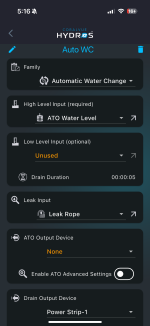
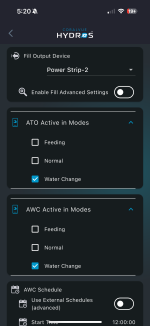
I setup an AWC config with the ATO part of the config disabled as I want that separate as it’s not a fully automated water change.

I’ve been testing it without water using the logs to see if it is doing what I expect and seems to work ok by using the water change mode to activate the AWC and deactivate the existing ATO config I have already setup.

Question is after filling. The logs indicate that it goes into a wait state for 10 min. Then an idle state for a couple minutes after that. Is there any way to change that wait and idle state as I would like a 30 gallon water change to complete as quickly as possible?

Or maybe there’s a different approach I should think about using ?

Thanks
 
I don't think it will work without the ATO being a part of it since it will not start the AWC if the full sensor is dry. It will do an ATO dispense first before starting the AWC sequence. I have mine set to run 4 times a day. My fresh saltwater reservoir is in the garage and the drain pump dumps into the drain at the kitchen sink. All three pumps are also in the garage. I use 2 Blenny pumps for AWC anf a Sole for ATO. The aquarium is 35ft away and the tubing between the garage and tank is the same 1/4" tubing used in RODI systems. My tank is just 42 gallons so splitting it into 4 times a day keeps the runtime down to around 14 minutes for each AWC pump each time. The tubing is run through insulated PVC conduit through the attic.
 
Thanks Danny.

It does seem to work with ATO output device set to “none” based on the logs. I suppose so long as I trigger starting it when high level input is “wet” it seems to kick off and start draining. My question is why the 10 min wait state in the logs after the fill cycle. And can that be shortened? Otherwise I suppose it will take many hours to complete. I already have a Hydros ATO system setup with the three level sensor in my sump that uses a separate ATO config. I’m using the same three level sensor for the high level input for the AWC config.

I have another level sensor in the sump that I use as a “sump dry” sensor which I could use for low level input. That will probably end up draining several gallons per cycle. Maybe I should do that vs using a drain duration and maybe that would make the 10 minute wait less of an issue…
 
That is built into it to do a top off using fresh saltwater instead of DI from ATO during that time period if needed.
 
Thanks Danny

I understand that. But as I’m not trying to have this be continuous over the whole day, that is not an issue for me. I’m trying to do the water change in an hour or two.

Best I can tell the wait time is calculated based on the schedule. So that the wait times are added as needed to have the water change take the length of time defined by the AWC start and end times. If I set that duration shorter the wait times reduce. It will be a little annoying to need to tweak that for every water change I do. But it’s manageable I suppose
 
Seems I’m wrong about the calculation of the wait time. I shortened the range of start and end time and wait seems to still be 10 min
 
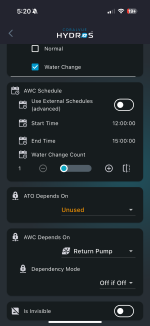
BTW, what does “water change count” do? If I set the schedule for an hour in duration what would be the behavior if I set that to 1 versus say 10?
 
Ok I found this in the docs.

The Control will turn OFF the Drain Pump and turn ON the Fill Pump until the top-water sensor reports “Wet” or until the timer (defined by the user in Advanced Settings) is expired, whichever comes first. At this point, HYDROS will allow the water level to settle for 10 minutes before returning to IDLE State.

Which explains the 10 minutes. That looks to be a fixed time.

Im still not sure I understand the water change count setting yet
 
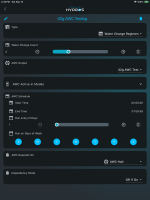
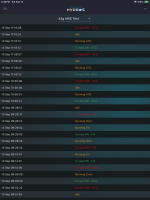
I will post my schedule. I have it set to do 4 water changes in a 24 hour period each day. So my water change count is 4 since I want 4 of them done during the schedule. So they are done every 6 hours starting at the start time of the schedule which is 2:00 am but that actually happens at 3 am DST on my system. I also posted a screenshot of the log that shows one of the water changes.

IMG_4100.png

IMG_4101.png
 
Thanks Danny

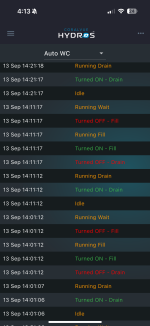
My log looks like this. With water change count set to 1. You can see there are multiple drains and fills. I have drain time set to 5 sec and the fill stops immediately as the water sensor always registers wet given nothing is draining (as it’s a test). So when does water change count kick in?

IMG_4064.png
 
Did you do a app and firmware update? If so did you do the upload changes that came up after the firmware part of the update? If not that is probably the issue. What most are doing is deleting the AWC output and starting over. That update changes was required to make changes to the settings file to make them compatible with the new firmware in the controllers.
 
Yes I did the update before I set this up. I’m on version 373
 
Yes I did the update before I set this up. I’m on version 373
I set it up after doing the update but I did use an external schedule instead of the one built into the output itself. I wonder if that could be the difference. The first time I used the AWC output type a while back it did not have the built in schedule. While I was using smart pumps I could not use that output for AWC but I did not delete the external schedule so I just used it when I set the AWC output back up. The screenshot I posted was of that external schedule setup in schedules.
 
Last edited:
Have you tried setting it to use external schedule then go to schedules in the left menu and setup a schedule using water change regimen type and choose the AWC output in the schedule and see if that will work.
 
I hadn’t . But just took a look at using the external schedule. The only thing I see there that is different is being able to select day of the week.

I setup an external schedule to run a test. It seems to work pretty much the same way

EDIT:
The difference I see is when external schedule is enabled it runs 1 water change during the period set. Which I assume is due to water change count being set to one. When not using the external schedule even if water change count is set to 1 water changes runs continuously for the duration of the time defined by start and end time
 
I hadn’t . But just took a look at using the external schedule. The only thing I see there that is different is being able to select day of the week.

I setup an external schedule to run a test. It seems to work pretty much the same way

EDIT:
The difference I see is when external schedule is enabled it runs 1 water change during the period set. Which I assume is due to water change count being set to one. When not using the external schedule even if water change count is set to 1 water changes runs continuously for the duration of the time defined by start and end time
There may be an issue with the internal schedule. That is why I mentioned trying it instead. It should only run the one time until either the run time set for the drain pump has lapsed or if using the low level sensor when that turns dry it should stop the drain pump and then start the fill pump until the high level sensor is wet. It should not run multiple times unless it is doing a top off during the 10 minutes after the fill pump first stops.
 
Back
Top