
Navigation
Install the app
How to install the app on iOS
Follow along with the video below to see how to install our site as a web app on your home screen.
Note: This feature may not be available in some browsers.
More options
You are using an out of date browser. It may not display this or other websites correctly.
You should upgrade or use an alternative browser.
You should upgrade or use an alternative browser.
Skimmer Time Schedule Request
- Thread starter Hind
- Start date
- Tagged users None
Users Who Are Viewing This Thread (Total: 0, Members: 0, Guests: 0)

Danny
HYDROS Expert
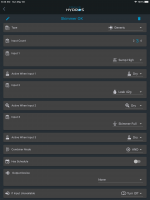
You can use the generic output with the input set to 0 to do this unless you have inputs also. You can also set the depends on on the skimmer setup to a generic output and then set the schedule on that output along with any other inputs you want to use to control the skimmer. I set one up like this below. I don't have the schedule set but all I would have to do is set has schedule and set the times. The actual skimmer output has the depends on setting set for this output and set to off when off.
I would really like to see this too. Seems like a super odd feature to be missing, especially 3 years after the request. It's nice to have a work around, better to have a native solution. No reason it should be difficult to add scheduling to every device within device properties. Simple scheduling should be part of any controller setup from day one, and while I have really enjoyed the Hydros, this is a weird and annoying oversight.
I apologize if it's already been added and I don't see it.
I apologize if it's already been added and I don't see it.
Danny
HYDROS Expert
It is a part of the generic output type and has been since the Hydros was released. All you have to do is use the generic output type instead of the skimmer output type and the turn on has schedule and it will let you set a on time and off time. If you enable advanced settings on the output it even allows for multiple off and on times as long as they are all equal and happen a even amount of time apart. The skimmer output type is for someone getting started and makes it simpler to setup but almost any output can be done with the generic type or combiner type or a combination on more complex setups. Also even though it is the generic output type you can set the icon on the output for the skimmer output so unless you go into the settings you would not know the difference between the skimmer output type and generic output type.I would really like to see this too. Seems like a super odd feature to be missing, especially 3 years after the request. It's nice to have a work around, better to have a native solution. No reason it should be difficult to add scheduling to every device within device properties. Simple scheduling should be part of any controller setup from day one, and while I have really enjoyed the Hydros, this is a weird and annoying oversight.
I apologize if it's already been added and I don't see it.
Hey thanks for the tip about the icon, I love that! That satisfies my OCD.It is a part of the generic output type and has been since the Hydros was released. All you have to do is use the generic output type instead of the skimmer output type and the turn on has schedule and it will let you set a on time and off time. If you enable advanced settings on the output it even allows for multiple off and on times as long as they are all equal and happen a even amount of time apart. The skimmer output type is for someone getting started and makes it simpler to setup but almost any output can be done with the generic type or combiner type or a combination on more complex setups. Also even though it is the generic output type you can set the icon on the output for the skimmer output so unless you go into the settings you would not know the difference between the skimmer output type and generic output type.
pmoz
New member
It's great that there's a work-around for this.
But what would be greater, is if each output had the scheduler feature and the end user didn't have to google for an answer and work-around. As a software developer, my expectation when I received a Hydros was that the interface would be constantly improving.
I realize that my two posts so far sound like "get off my lawn," guy, but while this software is tremendous, it could be better and any speed bump that limits the end user's ability to quickly and intuitively configure their equipment negatively impacts the end user which impacts adoption (and sales) of Hydros.
I want this eco-system to blossom.
But what would be greater, is if each output had the scheduler feature and the end user didn't have to google for an answer and work-around. As a software developer, my expectation when I received a Hydros was that the interface would be constantly improving.
I realize that my two posts so far sound like "get off my lawn," guy, but while this software is tremendous, it could be better and any speed bump that limits the end user's ability to quickly and intuitively configure their equipment negatively impacts the end user which impacts adoption (and sales) of Hydros.
I want this eco-system to blossom.
Danny
HYDROS Expert
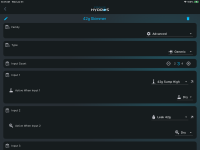
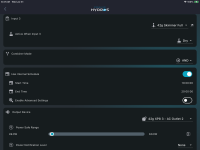
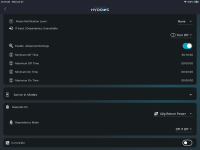
The generic output type is for more advanced setup of an output. The Skimmer type is for getting a skimmer up and going with the most common type of setup for one. If you want to control with more than a skimmer level sensor for shut off when full then you would use the more advanced generic output type for that. With it you can use up to 9 inputs and a schedule if you want to control it. All you have to do is switch the family setting to advanced and then set type to generic and then fill in the added settings. The rest of the setup should still be there. Then click on the pen in upper left of the settings and this will bring up a popup for either changing the name of selecting a different tile icon. Below is my full skimmer settings except for the active in modes settings I did not expand them for the screenshot. I do not normally setup a schedule on my skimmer but I turn it on for the screenshots since that was what the thread is about, I do have three inputs that control my skimmer. The first is a sump level high sensor. The second one is a leak detector in the stand where my skimmer collection container is at. The third is a sensor in the collection container. I use the AND combiner type so all three inputs have to be in the active state before the output is allowed to turn on if the other settings are also satisfied. One of them is the schedule which in this case it would have to be between 10am and 8pm for it to be on. It also has a minimum off time setup to 10 minutes so if it does turn off it will not come back on for at least 10 minutes from the time it turns off. The exception to this is if the depends on setting forces it off then the 10 minute countdown starts when the depends on becomes no longer active. This output has the depends on set to the return pump. The dependency mode is set to off if off. So if the return is turned off the skimmer output is also turned off.It's great that there's a work-around for this.
But what would be greater, is if each output had the scheduler feature and the end user didn't have to google for an answer and work-around. As a software developer, my expectation when I received a Hydros was that the interface would be constantly improving.
I realize that my two posts so far sound like "get off my lawn," guy, but while this software is tremendous, it could be better and any speed bump that limits the end user's ability to quickly and intuitively configure their equipment negatively impacts the end user which impacts adoption (and sales) of Hydros.
I want this eco-system to blossom.
Here is the screenshots after clicking on the pin in upper left of the settings screen. The first is the popup when you can either change the name or select the icon to change it. The second screenshot is the screen for changing the icon. You can scroll up and down through the different icons available to choose from. In this case it would be the skimmer icon.
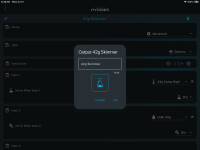
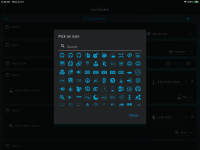
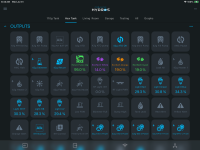
This is a screenshot of the outputs on my 42g tank and the skimmer is on the second row and is the second tile. That does not seem too hard to me. It is a more advanced setup so it would probably be a more advanced aquarist setting something like this up. Most beginners will probably just use the pre configured output type for the skimmer. Basically the skimmer output type is a preconfigured version of the generic output type. So if you allow all settings on every preconfigured output then there would be no need for them since it would just be the generic output and you would set it up as needed but for a beginner that might get overwhelming if they have never used a controller before.
pmoz
New member
Dang @Danny!
That is a response! Thank you for your thoughtful and extremely thorough response.
Judging by those outputs, you are a Hydros Expert!
I had already gone through changing the skimmer to the generic input type, but it's still valuable to have such a detailed example here.
I am just struggling with the thoughts behind some of these software decisions.
Like, why limit the presets? These options are clearly available, but their hidden for the presets.
Limiting the options makes the presets useless, in at least some cases, instead of helpful.
It just doesn't make any sense to me since my entire work day is devoted to user interfaces and how to make them easy and intuitive but powerful.
Thanks again for all of your time.
That is a response! Thank you for your thoughtful and extremely thorough response.
Judging by those outputs, you are a Hydros Expert!
I had already gone through changing the skimmer to the generic input type, but it's still valuable to have such a detailed example here.
I am just struggling with the thoughts behind some of these software decisions.
Like, why limit the presets? These options are clearly available, but their hidden for the presets.
Limiting the options makes the presets useless, in at least some cases, instead of helpful.
It just doesn't make any sense to me since my entire work day is devoted to user interfaces and how to make them easy and intuitive but powerful.
Thanks again for all of your time.